

A vendor account only has a business-credit role when the vendor reports payment activity. Net 30 accounts for chiropractic offices let a practice purchase eligible business items on invoice terms and pay within the agreed period. The account’s usefulness depends on whether its purchases fit the practice and its payment activity is reported to business credit bureaus.
For a chiropractic office, choosing an account means considering more than the payment window. The owner needs to connect the purchase to the practice’s operations, understand the account terms, and keep invoices organized. Those decisions matter whether the business is an established practice or a newly formed LLC setting up its first vendor relationships.
This article explains how to assess a reporting vendor account, manage its application and invoices, and understand the role of bureau reporting. It also outlines practical steps for choosing purchases that fit the office’s needs and avoiding common account-management mistakes. Use the guidance to make a considered decision, rather than treating a net 30 account as a guaranteed path to a particular credit result.
Key Takeaways
- Choose a vendor account based on whether its purchases fit your chiropractic office’s actual business needs.
- Before ordering, understand the payment deadline and how the vendor reports payment activity.
- Keep business account details and payment records organized to support consistent account management.
- Consider a reporting vendor that offers apparel, embroidery, or office supplies on net 30 terms.
- Business credit outcomes vary, so treat vendor reporting as one part of a broader credit-building effort.
Net 30 accounts for chiropractic offices
Net 30 accounts for chiropractic offices are vendor accounts with invoices due within 30 days under the stated terms. A practice uses an account to buy eligible business items, then pays the invoice by its due date. To evaluate one for credit-building purposes, focus on the vendor’s reporting policy, the purchases allowed, and the account’s payment requirements.
Start with the practice’s purchasing records. Identify recurring business expenses, such as office paper and supplies for organizing records. Keep these separate from personal purchases and clinical equipment. Buy only what the practice actually needs, not simply to generate account activity.
Review the vendor’s account terms before applying. Look for the application details required, the invoice payment deadline, accepted payment methods, and any stated reporting process. Make sure the legal business name and EIN on the application match the practice’s business records. Consistent details help the vendor associate the account with the correct business.
Understand how reporting fits the process
Opening an account and building a credit file are separate actions. A vendor account creates a purchase-and-payment record; vendor reporting transmits eligible account activity to business credit bureaus. Read the reporting terms to identify which bureaus receive data and how often submissions occur. Do not assume every vendor reports simply because it offers net 30 terms.
After ordering, record the invoice date, amount, due date, and payment confirmation in the practice’s bookkeeping system. Assign someone to review invoices and track due dates. Reconcile each vendor statement with the order and accounting record to catch duplicate charges, incorrect amounts, or payments that were not applied as expected.
The O*NET database includes over 900 occupation profiles covering more than 55,000 jobs across the U.S. economy, according to the U.S. Department of Labor, Employment and Training Administration. O*NET describes occupations and work activities. It does not determine a chiropractic office’s eligibility for a vendor account or its reporting terms. For a practice owner, those decisions depend on the vendor’s account requirements and the business information submitted.
Checklist for evaluating an account
Use this sequence before ordering to keep purchases tied to the practice’s operating needs and make the account easier to manage.
- List recurring business purchases and identify which ones fit the vendor’s eligible categories.
- Read the account application requirements and prepare matching business information.
- Review the invoice terms, payment method, and reporting policy before ordering.
- Assign an owner for invoice entry, due-date tracking, payment, and recordkeeping.
- Save the invoice and payment confirmation, then reconcile them with the practice’s books.
Common mistakes to avoid
- Applying before checking whether the vendor reports account activity to business bureaus.
- Using inconsistent business names or EIN details across the application and records.
- Ordering items the practice does not need just to create a transaction.
- Tracking payment dates informally instead of recording invoice due dates.
- Assuming an account opening alone changes a business credit file.
Net 30 accounts for chiropractic offices work best as part of organized purchasing and bookkeeping. Evaluate the vendor’s terms, choose a useful business purchase, and maintain clear records from application through payment. Treat account management as a repeatable business process, with each invoice handled according to its written terms.
The CEO Creative: net 30 apparel vendor
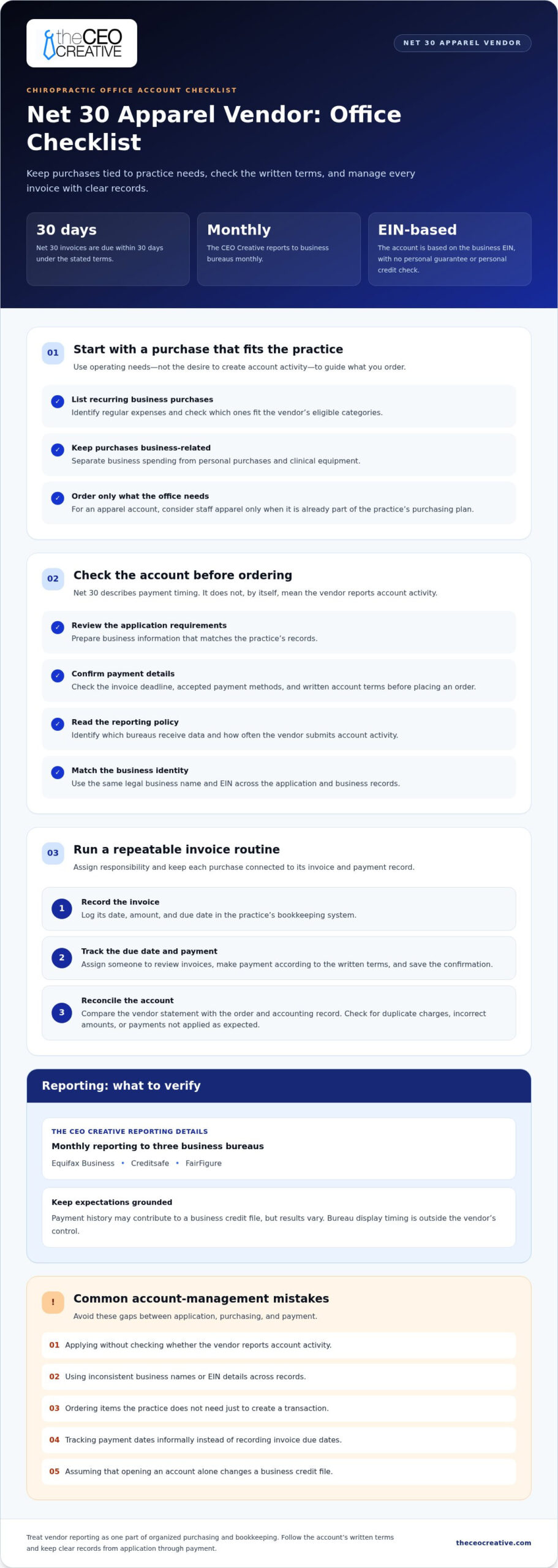
The CEO Creative offers a net 30 apparel vendor option for chiropractic offices purchasing staff apparel as a planned business expense. A practice ordering shirts or embroidered apparel can use a net 30 apparel vendor account for that purchase, then manage payment under the account’s terms.
The account is based on the business’s EIN, with no personal guarantee or personal credit check. Reporting is monthly to Equifax Business, Creditsafe, and FairFigure. Payment history may contribute to a business credit file, but results vary, and bureau display timing is outside the vendor’s control.
Consider this option when apparel is already part of the office’s purchasing plan and the payment schedule fits its cash flow. Visit theceocreative.com to review the account and decide whether it suits your practice.
FAQs
What does net 30 mean for a chiropractic office?
It means the office receives an invoice for an eligible business purchase and pays according to the vendor’s net 30 terms. Review the specific invoice for its due date and payment instructions.
Can a net 30 vendor account help build business credit?
A reporting vendor submits eligible account activity to business credit bureaus. Opening an account does not guarantee a particular credit score or outcome.
Should a chiropractic practice order items only to build credit?
No. Choose purchases that meet the practice’s business needs and fit its budget. An unnecessary order adds an expense without supporting daily operations.
What should an office review before applying?
Read the application requirements, eligible purchase categories, payment terms, and reporting policy. Check that the business information you enter matches the practice’s records.
What records should the practice keep?
Keep the application, invoices, payment confirmations, and account statements with the practice’s business records. Reconcile each invoice with its order and bookkeeping entry.
Does every net 30 vendor report to business credit bureaus?
No. Net 30 terms describe payment timing, not reporting. Review the vendor’s stated reporting policy to understand whether account activity is submitted.