


A vendor account can help a daycare manage eligible purchases while building business credit through reported payment history. Net 30 accounts for daycare centers provide payment terms on business purchases, not cash for startup costs or a loan.
When you’re opening a center or covering routine operating needs, timing purchases and payments can matter. Net 30 terms create a set period to pay a vendor invoice, so they may support cash-flow planning when used alongside a budget and available funds.
This guide explains what daycare operators can order on terms, how an account works from application through monthly reporting, and what to consider before relying on vendor terms. Payment activity is reported monthly to Equifax Business, Creditsafe, and FairFigure. Results vary, and bureau display timing is determined by each bureau.
Key Takeaways
- Identify which routine daycare purchases fit a vendor’s terms before opening an account.
- Understand the business details a vendor may use to assess an application, including how newer LLCs can apply.
- Follow the apply, order, pay, and reporting cycle to keep vendor activity organized.
- Review payment terms and account requirements so purchases fit your operating budget.
- Use a simple checklist to manage the account and avoid common payment and application errors.
What Can Daycare Centers Order on Net 30 Terms?
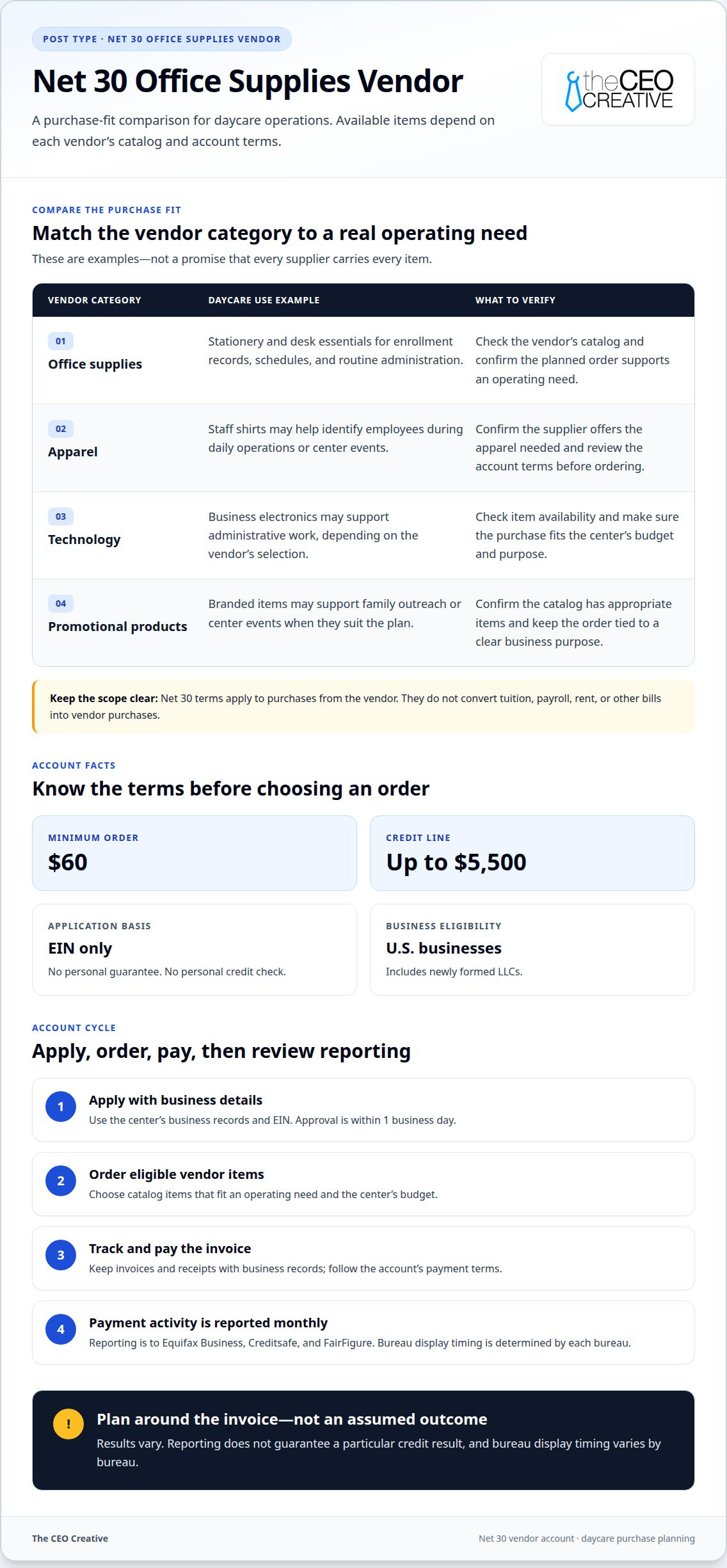
A daycare can use a Net 30 vendor account for business purchases included in that vendor’s catalog. The specific items depend on the vendor category and account terms. For example, office-supply vendors may offer stationery and desk essentials, while apparel vendors may offer staff shirts. Technology vendors may carry business electronics, and promotional-product vendors may offer branded items for center events.
Match each purchase to an operating need before placing an order. A center preparing enrollment packets might need paper and printing services. A team ordering staff apparel may look at an apparel supplier. A center planning family outreach could consider promotional products. These are examples of vendor categories, not a guarantee that every vendor stocks every item.
- Office supplies: Consider items used for enrollment records, schedules, and routine administration.
- Apparel: Staff shirts can help identify employees during daily operations or center events.
- Technology: Business electronics may support administrative work, depending on the vendor’s catalog.
- Promotional products: Branded items can support outreach or family events when they fit the center’s plans.
Net 30 terms apply to purchases from the vendor, not to every daycare expense. They do not convert tuition, payroll, rent, or other bills into vendor purchases. Keep invoices and receipts with the center’s records, and categorize each purchase according to its business purpose. This makes it easier to track what was ordered and when payment is due.
Tax-credit rules are separate from vendor terms. For U.S. child and dependent care credit purposes, the Internal Revenue Service says a qualifying child must be under age 13 unless the person qualifies under another category. The Internal Revenue Service sets maximum work-related expenses used to calculate the credit at $3,000 for one qualifying person and $6,000 for two qualifying persons. The Internal Revenue Service states that the credit percentage is 35% when adjusted gross income is $15,000 or less. These figures concern taxpayers claiming the credit, not a daycare’s Net 30 purchases.
What Business Credit Requirements Do Daycare Centers Need for Net 30 Accounts?
Vendors offering net 30 accounts for daycare centers may request basic business details before reviewing an application. Common fields include the legal business name, entity type, Employer Identification Number (EIN), business address, and billing contact. Enter the same information used in the center’s business records. For example, an LLC should apply under its registered name rather than an owner’s personal name.
Prepare the requested details before starting the application. Decide who has authority to accept account terms and who will handle invoices after approval. A newly formed center can organize its business identification information, while an established center can review its billing contacts for accuracy. Vendors set their own application processes, so don’t assume one supplier’s document requests apply to another.
Read the account terms carefully to understand the payment obligation and how the account is structured. Business identification, a personal credit check, and a personal guarantee are different things. A personal guarantee can make an owner responsible for a business obligation, so review the terms and ensure the signer understands the responsibility before accepting them.
Business credit history is only one part of vendor account review. Keep the application information complete, use a business email and phone contact where requested, and make sure the proposed purchases have a clear operating purpose. For example, a center planning staff apparel can identify the intended order and the person responsible for the invoice before applying.
Compare the account’s requirements with the daycare’s structure and purchasing process. An EIN-based Net 30 account is one option for businesses seeking vendor tradeline activity. The center should choose terms it can manage and ensure the application details match its records.
Account readiness also depends on whether the center can track the obligations and resources behind its purchases. The guide advises daycare businesses to review investment results and request resource reallocation if required return thresholds are not achieved within 1 year of launch. The Diocese of Charleston child development center chart requires a single repair or replacement cost over $5,000 to be recorded in the appropriate capital outlay account. It also says tuition receivable may be credited to account 412002 for subsidized tuition. These records can help the business keep operating expenses, larger facility costs, and tuition balances distinct when reviewing what it can responsibly purchase and pay.
For a group operating across campuses, consistent accounting practices can make vendor bills easier to monitor. Multi-site childcare businesses should use consistent location tracking on a shared chart of accounts rather than creating a different chart for every campus. Shared costs should be allocated using a simple documented basis, such as licensed capacity, enrollment, or headcount, and that method should be applied consistently. A multi-site childcare group should reconcile every operating bank account and credit card as part of its month-end close. Together, these practices give staff a clearer way to identify which location incurred a cost, check that charges are recorded consistently, and review account activity before invoices are paid. The center can use its records to connect planned purchases with the location and budget responsible for them, while keeping the application and payment process aligned with its internal accounting.
How a Net 30 Account Works: Apply, Order, Pay, and Repeat
Start by completing the vendor’s business application with the requested organization and billing details. Review the account agreement before accepting terms. Once the vendor approves the application, use the account to place an eligible business order. Keep the order confirmation so it can be matched to the invoice when it arrives.
When the invoice arrives, check the amount due, payment deadline, and payment instructions. Record it in the daycare’s accounting system and route it to the person responsible for accounts payable. For example, a staff apparel purchase can be recorded under the center’s apparel expense category and follow its usual approval process.
- Apply: Submit the business application and read the account agreement.
- Order: Select eligible items that support a planned business need.
- Record: Match the order confirmation to the invoice and log its due date.
- Pay: Send payment according to the invoice and retain proof of payment.
- Repeat: Place another order when it fits the center’s needs and budget.
Net 30 describes the vendor’s payment arrangement. Use the due date printed on each invoice rather than relying on an assumed date or a previous order’s schedule. A calendar reminder can help the daycare route invoices in time, especially when different staff members place orders and process payments.
Reporting depends on the vendor’s stated practices. Payment activity may be sent to business credit bureaus, while each bureau handles its own processing and display. Keep the invoice and payment confirmation together so the center can refer to them if it needs to review an account record. Reported activity does not ensure a particular credit score or financing outcome.
Review the agreement for any applicable fees, interest, and order conditions before purchasing. These terms can differ by vendor. Confirm how charges are described and when they apply, then consider them alongside the purchase amount and the daycare’s cash-flow plan. A clear record of orders, due dates, and payments makes the account easier to manage over time.
Which Business Credit Bureaus Report Net 30 Payments?
Business credit bureaus maintain separate files, so an account may not appear identically in every business profile. The CEO Creative reports payments monthly to Equifax Business, Creditsafe, and FairFigure, but each bureau controls how it processes and displays information. Keep the daycare’s account details and payment records organized.
Use the daycare’s legal business name and EIN consistently in its business records. If the center also uses a trade name, distinguish it clearly in internal files. Keep the application, invoice, and payment confirmation together under the same account record to make transactions easier to identify.
A vendor sends account activity for reporting, while each bureau processes and displays information in its own file. For example, a daycare may have paid an invoice and kept proof of payment before the account appears in its business file. Display timing can vary, so an immediate update should not be expected.
- Keep identity details aligned: Use the same legal business name and EIN in account records.
- Retain transaction records: Store invoices and payment confirmations together for each order.
- Track reporting separately: Note which vendor account is expected to contribute activity to a business file.
If an account entry looks inconsistent, first compare the business identity and transaction records. Gather the invoice, payment confirmation, and account information to identify the specific discrepancy. This keeps the daycare’s purchase and payment records clear and separate from bureau processing.
Business credit files reflect reported account activity, but they do not promise a particular score or financing decision. Continue paying each invoice according to its terms after payment activity has been reported. Organized records help the daycare track its obligations and the information associated with its business identity.
Net 30 Account Checklist for Daycare Centers
Use this checklist before opening an account and throughout the payment cycle. It helps connect each purchase to a real daycare need, clear terms, and organized records.
- Confirm the business identity. Enter the daycare’s legal name, EIN, business address, and billing contact consistently. For an LLC, avoid substituting an owner’s personal name for the company name.
- Match the vendor to a planned purchase. Identify the item and business purpose first, such as staff apparel or office materials. Don’t order simply to create account activity.
- Review eligibility and application details. Check which business information the vendor requests and whether its account terms involve a personal guarantee or personal credit check.
- Read the full payment terms. Find the invoice due-date rules, accepted payment methods, and any fees or interest described in the agreement. Save a copy with the account records.
- Check the order minimum and credit limit. Confirm the purchase meets the vendor’s minimum and stays within the account’s available limit. Avoid treating the limit as a spending target.
- Set an invoice tracking process. Record each invoice number, order date, amount, and due date in the center’s accounting system. Assign a staff member to route invoices for payment.
- Reconcile the purchase and payment. Match the vendor invoice to the order and business expense category. After payment, retain proof of payment with the same record.
- Understand reporting expectations. Record the vendor’s named bureaus and reporting frequency. Keep invoices and payment records available if account activity needs to be reviewed.
Revisit the process when the daycare changes its billing contact, purchasing routine, or account terms. If a new administrator takes over accounts payable, update the invoice-routing steps and assign any open balances. Consistent procedures help prevent missed due dates and make transactions easier to trace.
Common Mistakes to Avoid With Daycare Net 30 Accounts
A vendor account needs the same care as other daycare expenses. Common mistakes can lead to confusion, missed payments, or purchases that do not serve the center.
- Ordering just to create activity. A purchase should meet a real business need. Buying unnecessary items can strain the center’s budget without guaranteeing a credit benefit. Plan the purchase before placing the order.
- Entering inconsistent business information. Using a trade name in one place and an LLC’s legal name elsewhere can complicate account records. Keep the business name and EIN consistent across the application and billing documents.
- Assuming approval means every purchase is affordable. An approved account is not a spending target. Check available account terms and the daycare’s cash flow before placing an order, especially during periods with other scheduled expenses.
- Overlooking invoice due dates. An invoice can be routed late if staff don’t know who handles payment. Assign an accounts-payable contact, record each due date, and keep proof of payment with the invoice.
- Skipping the written terms. Don’t rely on assumptions about fees, interest, minimum orders, or payment methods. Read the account agreement and invoice details before ordering, then record any requirements that affect the center.
- Expecting immediate bureau updates. A vendor’s reporting schedule and a bureau’s display process are different steps. Keep payment records, note the named bureaus, and allow their systems to process reported activity.
Use a repeatable process for every account: confirm the purchase, route the invoice, pay by the stated due date, and retain the records. If administrators change, transfer these steps and details of open invoices to the new account owner. This makes vendor activity easier to track and less dependent on one person’s memory.
The CEO Creative
The CEO Creative gives daycare operators a vendor-account option for eligible business purchases and reported payment activity. It may fit a center that wants to organize routine purchasing while developing a business credit history through vendor payments. A Net 30 account is for purchases from a vendor, not cash for payroll, rent, or other startup expenses.
Start with a practical need. A center preparing staff apparel could consider a Net 30 apparel vendor. Other available categories include t-shirt supply, embroidery, and office supplies. Choose purchases that already belong in the center’s operating plan, rather than ordering solely to create account activity.
Choose products according to their intended business use. Staff shirts or embroidered apparel can support a consistent team appearance, while office supplies can help with routine administration, enrollment paperwork, and record organization. The right choice depends on the daycare’s needs and budget.
For a new center, distinguish vendor purchases from broader startup funding needs. A vendor account supports eligible purchases and payment history, but it does not replace working capital or remove operating costs. Base purchases on the center’s cash-flow plan, and keep invoices and payment records organized.
Before ordering, review the account terms and make sure the process fits the daycare’s bookkeeping routine. Assign responsibility for receiving invoices, tracking due dates, and recording payments. These controls help the center manage its account consistently as staff and purchasing needs change.
The CEO Creative’s Net 30 vendor accounts are relevant when a daycare needs business-use purchases and wants vendor payment activity reported toward its business credit profile. Results vary, and reporting does not guarantee a particular score or financing outcome. Choose the account only when its terms and eligible purchases fit the center’s plans.
Make Your Next Vendor Decision Deliberate
Net 30 accounts for daycare centers work best as part of a repeatable purchasing process, not as a reason to spend more. Before opening an account, identify a real business need, decide who will manage invoices, and make sure the payment schedule fits your operating plan.
The CEO Creative offers vendor accounts connected to apparel purchases, including t-shirts and embroidery. These options may suit a daycare planning staff apparel while keeping purchases and payment records within its business credit-building approach. Choose an order for its practical use first, then manage the invoice and payment carefully. Results vary, and a vendor tradeline does not guarantee a particular credit outcome.
Keep the next step simple: connect the account terms to a clear purchase and a process your team can maintain. That gives your center a practical basis for deciding whether a vendor account fits its plans.
Build the process one considered purchase at a time, keeping your daycare’s operating priorities in view.
Frequently Asked Questions
What does Net 30 mean for daycare centers?
NET 30 terms let a daycare order eligible business items from a vendor and pay later. The balance is due 30 calendar days from shipping, and payments are reported to the major credit bureaus. For example, a center ordering staff shirts can record the invoice under its apparel expenses, then track the payment separately from payroll, tuition, and other operating costs.