


A Net 30 vendor account lets a security company purchase eligible goods or services and pay the invoice within 30 days of its date. When the vendor reports payment history, those transactions may contribute to the company’s business credit file.
These accounts apply to vendor purchases, not cash for payroll or other expenses. Their usefulness depends on choosing purchases the business needs and managing invoices on time. This guide explains how Net 30 terms work, what security companies may need to apply, and how account activity moves from purchase to payment and reporting. You’ll also learn how to choose a vendor account that fits your operations and avoid common application and payment mistakes.
Key Takeaways
- Choose purchases from eligible vendor categories that fit your security company’s real operating needs.
- Understand the invoice date and 30-day payment term so you can plan payment on time.
- Know which business credit bureaus receive monthly reports and why account activity may take time to appear.
- Use a step-by-step application and payment process to keep account details and invoices organized.
What Security Companies Can Order on Net 30
The CEO Creative offers Net 30 vendor purchases in apparel, T-shirts, embroidery, and office supplies. These categories can serve different business needs, so security companies can consider which purchases already belong in their operating plans. The account is for eligible vendor orders, not cash for payroll or other expenses. A useful starting point is to match a category to a planned purchase, rather than choosing items solely for possible credit reporting.
Apparel and T-shirts may fit a company’s staff or business identity needs. For example, a security firm planning clothing purchases can consider whether apparel is relevant to its operations before ordering. The Net 30 apparel vendor category is one option for that type of purchase. Consider the purpose of the order, who will use the items, and whether the purchase fits the company’s budget and purchasing process.
Embroidery can help a security company put its branding on workwear. Office supplies serve a different purpose, supporting administrative tasks such as organizing records and handling routine paperwork. Choose the category that fits an actual business need, then confirm the purchase supports your day-to-day operations.
Use these questions to assess which category makes sense:
- Staff needs: Does apparel or a T-shirt purchase fit a current business requirement?
- Brand use: Would embroidery support a planned clothing purchase?
- Office operations: Are office supplies needed for current administrative work?
- Order planning: Can the business manage the purchase as part of its normal budget and invoice process?
For net 30 accounts for security companies, the purchase should remain useful even apart from any potential contribution to a business credit file. Keep the order connected to an actual business need, and choose a category that fits the company’s operations. Consider how the purchase will be recorded and managed alongside other vendor orders. Payment history may contribute to a business credit file, but it doesn’t guarantee a particular score or outcome.
If these categories fit your purchasing plans, contact The CEO Creative and apply through the Net 30 business account page.
How a Net 30 Account Works
Net 30 is a type of trade credit: a vendor lets a business receive eligible goods or services and pay later, under agreed terms. Trade credit is the broader supplier arrangement; “Net 30” sets the invoice payment period at 30 days. A business credit card is different because purchases are charged to a card account, not billed directly by the supplier.
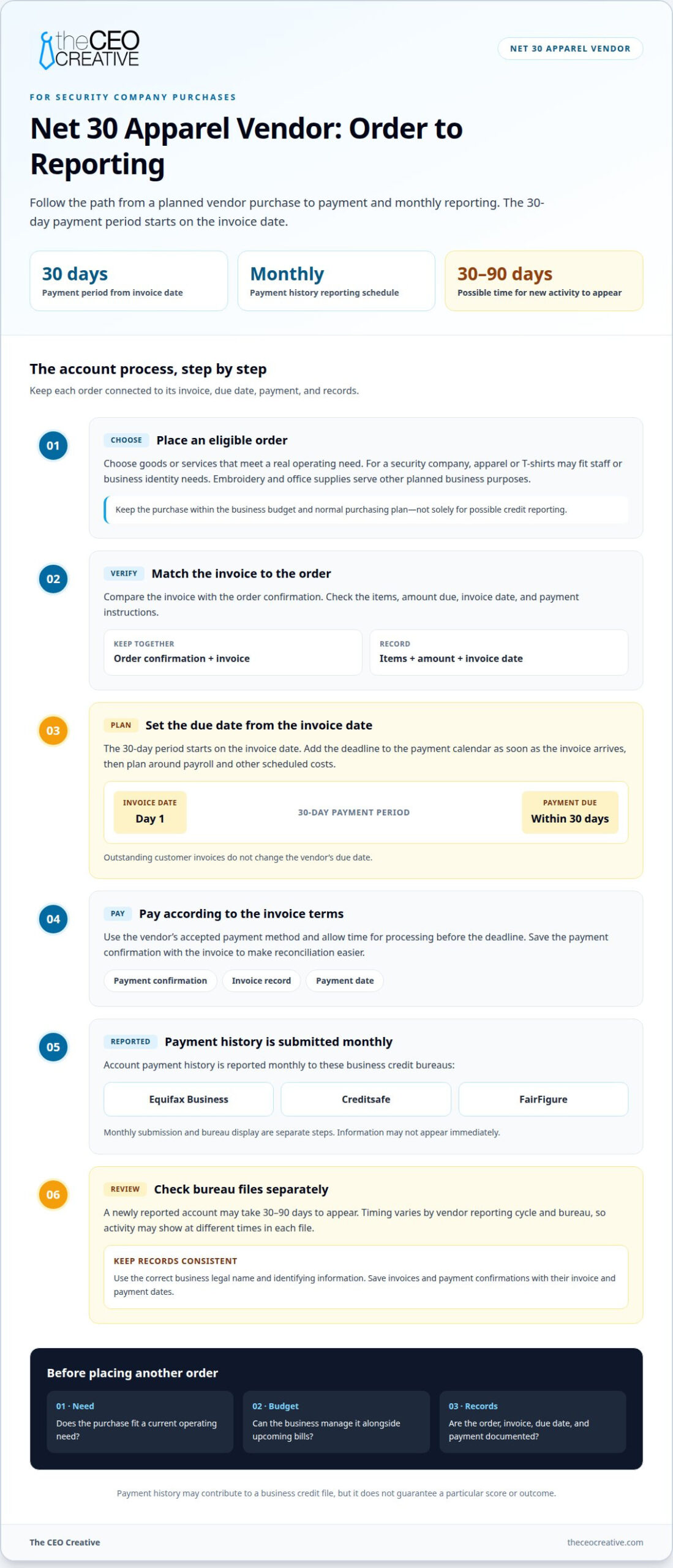
- Choose and place an eligible order. Select goods or services that fit the company’s actual operating needs. Submit the order through the vendor’s process, and keep the order confirmation. For a security company, a planned purchase should fit the business budget without relying on a future client payment to cover it.
- Match the invoice to the order. When the vendor issues an invoice, compare it with the order confirmation. Review the listed items, amount due, invoice date, and payment instructions. Save the invoice with the purchase record so your bookkeeping can connect the charge to the right business expense.
- Record the due date and plan cash flow. The 30-day period starts on the invoice date. Enter the deadline in your payment calendar as soon as the invoice arrives. A security company may have customer invoices still outstanding, but those receivables don’t change the vendor’s due date. Plan around payroll and other scheduled costs.
- Pay according to the invoice terms. Submit payment using the vendor’s accepted method and allow time for processing before the deadline. Keep the payment confirmation with the invoice. That record helps reconcile the purchase and shows when the business settled its obligation.
- Review reporting and decide whether to order again. A reporting vendor submits payment history monthly, but bureau display timing varies. Keep your transaction records while the information is processed. Before placing repeat orders, review current business needs and upcoming bills. Don’t order more simply because an earlier purchase was reported.
For startups and established security companies alike, the useful habit is connecting each order to its invoice, due date, payment, and records. That makes vendor purchases easier to manage alongside client billing. Review the Net 30 account terms as you decide whether this payment structure fits your purchasing process.
Which Business Credit Bureaus Receive Reports?
Payment history for this account is reported monthly to Equifax Business, Creditsafe, and FairFigure. Net 30 accounts for security companies may report activity to these bureaus, but a monthly submission does not mean each bureau will display the information at once. Reporting and bureau display are separate steps. Track your account records while each bureau processes its data.
- Keep account details consistent. Use your business’s correct legal name and identifying information on account records. If an invoice lists one name but a bureau file uses another, matching the records may be harder. For example, keep the name on your vendor account consistent with the name in your business-credit profile.
- Save invoices and payment records. File each invoice with its payment confirmation. Include the invoice date and payment date in your bookkeeping records. These details help connect a transaction to its reporting cycle and distinguish recent payment activity from older entries.
- Allow time for bureau display. A newly reported account may take 30 to 90 days to appear on a business credit report. Timing varies by vendor reporting cycle and bureau. For net 30 accounts for security companies, a payment submitted in one monthly cycle may not appear immediately in Equifax Business, Creditsafe, or FairFigure.
- Review each bureau file separately. Check Equifax Business, Creditsafe, and FairFigure as separate records. Don’t assume activity showing in one file will appear at the same time in the other two. Compare any listed account and payment history with your saved invoice and payment documentation.
- Address a specific discrepancy. If a report differs from your records, identify the bureau, account, and transaction involved. Use the invoice and payment confirmation to describe the difference clearly. For net 30 accounts for security companies, organized records help you pinpoint which reported activity you’re reviewing.
Monthly reporting is one part of a business credit history, not a promise of a particular score or result. Keep records organized and review each bureau file over time. Each bureau processes the information it receives, so reports may not update at the same time.
Checklist: Steps to Apply for a Net 30 Account
For a security company, the main risks are taking on invoice obligations that strain cash flow and missing the 30-day due date. Net 30 terms apply to eligible purchases, so don’t treat them as payroll funding or assume every vendor accepts every business.
- Confirm eligibility details. US businesses, including newly formed LLCs, can apply without a minimum time in business requirement. Prepare your legal business name and EIN. For an EIN-only account, the application is based on the EIN, with no personal guarantee or personal credit check.
- Choose a reporting vendor that fits. Select a vendor whose eligible categories match purchases your security company actually needs. Review the payment terms and reporting details before you apply. An industrial supplier, for example, may not fit a business seeking routine office or staff-related purchases.
- Complete the application accurately. Enter the business information consistently with your records and submit the required application details. Approval is within 1 business day, but that timing isn’t a promise of approval. Don’t assume revenue alone determines whether an application qualifies.
- Plan the first order. Check the vendor’s minimum order before placing an order. Select goods that serve an actual business purpose, and confirm the order amount fits your budget before accepting the invoice obligation.
- Schedule payment around cash flow. Record the invoice date and due date as soon as the invoice arrives. Pay the full amount within 30 days. Account for the gap between paying your vendor and collecting from a client, especially when payroll and customer billing fall on different schedules.
- Track reported activity. Keep the invoice and payment confirmation, then review your business credit reports. Monthly reporting does not mean bureau display is immediate; a new account may take 30 to 90 days to appear. Compare any visible activity with your saved transaction records.
Use this process for every application and order. Keep a clear record of eligibility, vendor terms, invoices, and payments so you can manage obligations without relying on a projected credit result. Review the account’s reporting and purchase terms before accepting a charge, and record each due date in your bookkeeping system.
Common Mistakes to Avoid
Net 30 accounts can support vendor payment history, but they also create invoices your security company must manage. Avoid these mistakes to keep purchasing decisions tied to real needs and a workable payment plan.
- Relying on guaranteed credit results. No vendor account can guarantee a particular business credit score or outcome. Treat reported payment activity as one part of your credit file, not a promise of approval for future financing or a specific score change.
- The minimum applies to an order, so account for it before selecting goods. Don’t add items your company doesn’t need simply to reach the threshold. Plan a purchase that fits business operations and your budget.
- Assuming bureau activity appears immediately. Monthly reporting and bureau display are separate processes. A recent payment may not show in a report right away. Keep your invoice and payment confirmation, then compare those records with the account activity shown in each bureau file.
- Ordering only to create a tradeline. A purchase should make sense for the security company even without its potential reporting value. Unneeded orders can add obligations without helping daily operations. Choose eligible goods your business can use, and keep the invoice amount within your payment plan.
- Ignoring the gap between vendor bills and client receipts. A client invoice that remains unpaid doesn’t change your vendor’s due date. Put the vendor invoice date and payment deadline on your cash-flow calendar. Consider payroll and other scheduled expenses before accepting a new order.
- Letting payment records become hard to match. Store each invoice with its payment confirmation and business account details. If your bookkeeping records use inconsistent names or omit dates, reviewing reported activity becomes harder. Keep transaction records together so you can identify a specific discrepancy clearly.
Use vendor terms for planned business purchases, not as a replacement for cash-flow planning. A consistent process helps you manage invoices and review reported activity without assuming a particular credit result.
The CEO Creative
The CEO Creative offers Net 30 vendor accounts for businesses building credit through eligible purchases. For security companies, the available categories include apparel, T-shirts, embroidery, and office supplies. Choose a category based on an actual operating need, then manage its invoice as part of your purchasing plan. The account is intended for business purchases and payment history, not as a source of cash for payroll.
US businesses, including newly formed LLCs, are eligible to apply, with no minimum time in business. The account is based on the EIN, with no personal guarantee or personal credit check. The stated approval window is within 1 business day, but approval is not guaranteed.
The CEO Creative reports payment history monthly to Equifax Business, Creditsafe, and FairFigure. That does not mean activity will appear on a bureau report immediately. Keep invoices and payment confirmations, and allow time for each bureau to process submitted information. Payment history can contribute to a business credit file, but it cannot guarantee a score or other credit outcome.
The company is BBB Accredited with an A+ rating. It has been in business for 6+ years, with 50,000+ reported tradelines and 5,000+ products in stock. These details provide context about the vendor and its account activity. For your business, the practical fit still comes down to whether an eligible purchase is useful and whether you can pay the invoice by its due date.
Before applying, consider how the account fits your records and cash-flow process:
- Choose a relevant category: Select apparel, T-shirts, embroidery, or office supplies for a genuine business purpose.
- Plan the order: Account for the minimum and avoid purchases made only to create activity.
- Manage the invoice: Record its due date and keep proof of payment with your business records.
Apply for a Net 30 account through The CEO Creative’s business account page.
Make Credit Building Part of Your Operating Routine
Net 30 accounts for security companies work best when purchasing and bookkeeping follow a repeatable process. Decide who approves orders, who records invoices, and who tracks payments. A clear handoff helps prevent vendor bills from getting lost among customer invoices, payroll records, and daily site operations.
Start with a purchase the business already needs, then fit the account into your cash-flow routine. Keep credit building secondary to sound purchasing decisions. Reported activity is one part of a business credit profile, and results vary. Aim for a process your team can maintain without unnecessary orders or payment pressure.
As your company grows, consistent records can make it easier to review purchasing patterns and manage vendor obligations. Set up a straightforward routine and build from there at a pace that fits your business.
Take the next step with a plan that supports your operations and long-term goals.
Frequently Asked Questions
What are net-30 accounts?
Net-30 accounts let a business buy eligible goods or services from a vendor and pay an invoice within 30 days. Each purchase creates an amount due under the vendor’s terms. For example, a security company ordering office supplies would receive an invoice for that order, rather than unrestricted funds to use for any business expense.
What does net 30 mean for a security company?
It means the security company has 30 days from the invoice date to pay the vendor for an eligible purchase. That date is separate from the company’s customer billing schedule. For example, money due from a client doesn’t change when the vendor invoice must be paid. Include vendor invoices in cash-flow planning alongside payroll and customer receivables.
What are the eligibility requirements for net 30 business accounts?
Eligibility depends on the vendor’s application criteria. For this account, US businesses, including newly formed LLCs, may apply without a minimum time in business. The account is based on the business EIN, without a personal guarantee or personal credit check. Keep business information accurate and consistent so the account can be associated with the right company.
How can a security company apply for net 30 vendor credit?
Start by selecting a vendor category that matches an actual business purchase. Complete the application with the company’s EIN and business details, then review the account’s order and payment terms before placing an order. Keep a copy of the application and account records. When the invoice arrives, record its due date and retain payment confirmation for your bookkeeping.
What documents do vendors require to open a net 30 account?
Requirements vary by vendor. For an EIN-based application, have the business EIN and accurate company details ready. Use the legal business name consistently, and make sure the application information matches company records. A vendor may request additional details, so follow the application fields and instructions rather than assuming every vendor uses the same document checklist.
What fees, interest, or late-payment penalties apply to net 30 accounts?
The account’s Net 30 payment period is described as 30-day interest-free. Fees or consequences for late payment depend on the terms that apply to the account. Read the written terms before ordering, and note any stated due date or late-payment condition. Don’t assume that a customer’s overdue invoice extends your payment deadline to the vendor.
How can a new security company qualify for net 30 terms without established business credit?
A newly formed US LLC can apply for this account without a minimum time in business, using its EIN. Established business credit isn’t the only factor to consider: complete the application accurately and choose a useful purchase the company can pay for on time. Approval is not guaranteed, and reported activity does not promise a particular credit result.