


A Net 30 application doesn’t automatically require a personal credit check or guarantee. A net 30 account documents checklist for first-time applicants should include your registered business name, EIN, business address, business phone number, business bank account details, and business email address.
It’s reasonable to know what you’re agreeing to before applying, especially when you’re building business credit through vendor accounts. The documents you prepare matter, but so do the account’s personal-credit requirements, payment terms, fees, and purchase requirements. This guide explains what to gather, which terms to review, and how to understand reporting before you apply. You’ll also learn how to distinguish an EIN-only account from one that may involve a personal credit check or guarantee, so you can choose an option that fits your business and purchasing needs.
Key Takeaways
- Prepare your business identity and contact details before applying, including your EIN, registered name, address, phone, and email.
- Match a reporting Net 30 vendor to purchases your business already needs, and review its minimum order and payment terms.
- Check whether an account relies on business details alone or involves a personal credit check or guarantee.
- Understand which business credit bureaus receive monthly payment reporting, and allow for bureau display timing to vary.
- Review the numbered application checklist to catch common errors and organize your details before submitting an application.
What Can You Order on Net 30 Terms?
A reporting Net 30 vendor account applies to eligible purchases from that supplier, not to every business expense. Start with items your company already needs. A useful match supports routine operations, fits your industry, and makes sense within the supplier’s catalog and account rules. That keeps the decision focused on both purchasing needs and payment terms.
Business categories may include apparel, office supplies, technology and electronics, and promotional products. A company buying garments for staff may consider a Net 30 apparel vendor. Businesses with recurring workplace needs might consider an office supplies vendor. A company preparing branded items for an event or customer outreach may look at a promotional products vendor.
- Apparel: Consider clothing for staff or other genuine business needs.
- Office supplies: Match routine workplace purchases to the supplier’s eligible catalog.
- Technology and electronics: Review whether available items fit your business operations.
- Promotional products: Consider branded items for planned outreach or events.
Before choosing, list the items your business actually needs and compare them with the vendor’s product categories. A company planning to order staff apparel, for example, has a clear category fit, while a business shipping delicate goods might look into specialized materials from Packaging For Industry (PFI). Also review any minimum purchase requirement and avoid adding unrelated items just to meet it.
Industry is only one part of the decision. Consider how often your business uses the category, whether the products fit your work, and whether you can manage the invoice by its due date. A one-time need may call for a different purchasing plan than a recurring operational requirement. Don’t treat a vendor account as a reason to buy goods your business wouldn’t otherwise need.
Some businesses have needs across more than one category. In that case, an account that supports purchases across categories can simplify vendor management. The business Net 30 account connects eligible purchases with a reporting vendor account. Choose based on actual operations first, then consider whether the account’s minimum, eligible categories, and payment schedule suit your purchasing plan.
How a Net 30 Account Works
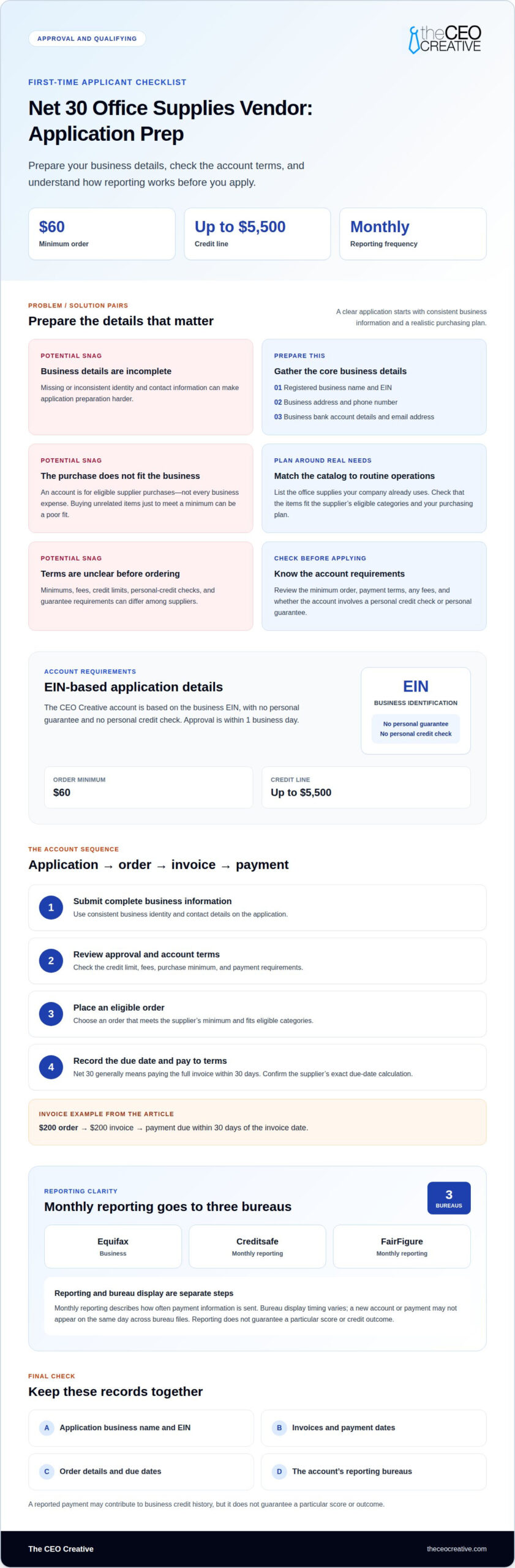
The process typically begins with an application, followed by approval, an eligible order, an invoice, and payment. The application may ask for business identity and contact details, such as the registered name, EIN, address, phone, and email. Suppliers set their own review requirements. Some focus on business verification; others may use a soft personal credit check or require a personal guarantee.
Once approved, place an order that meets the supplier’s minimum and fits the account’s eligible categories. The invoice states the balance and due date. Net 30 generally means paying the full invoice within 30 days. For example, a $200 order creates a $200 invoice, with payment due within 30 days of the invoice date. Review the supplier’s terms for its exact due-date calculation.
- Submit the application with complete, consistent business information.
- Review the approval decision, credit limit, fees, and account terms.
- Place an eligible order that meets the supplier’s minimum purchase.
- Record the invoice date and due date, then pay according to the terms.
Minimums, account fees, credit limits, credit checks, and guarantee requirements can differ among suppliers. Read those terms before applying, including whether any fee applies and when it is charged. A minimum purchase is the smallest qualifying order, not a required credit balance. The Net 30 terms calculator can help organize a due date from an invoice date.
After payment, the supplier may report account activity to business credit bureaus according to its reporting policy. Reporting frequency and the timing of a bureau entry are separate considerations. Keep invoices and payment records so you can track the account accurately. A reported payment may contribute to business credit history, but it doesn’t guarantee a particular score or outcome.
Repeat orders should follow the same practical sequence: choose eligible items, check available credit and terms, place the order, then track and pay its invoice. Amazon Business Pay by Invoice is a separate payment option with its own eligibility criteria; approval for it is not the same as approval for a vendor Net 30 account. Treat each supplier account as a separate application and payment relationship.
Which Business Credit Bureaus Does the Account Report To?
The CEO Creative reports monthly to Equifax Business, Creditsafe, and FairFigure. Monthly reporting describes how often payment information is sent. It doesn’t mean a new account or payment will appear in each bureau’s file on the same day. Bureau display timing varies, so a delay in visibility doesn’t by itself indicate whether a payment was reported.
After opening an account, keep the key details together: the business name used on the application, invoices, payment dates, and the account’s reporting bureaus. This gives you a clear record to refer to when reviewing your business credit profile. If your business uses both a registered name and a trade name, keep the application and order details consistent so you can identify the account in your records.
A reported tradeline is payment-account information associated with a business. Reporting is separate from an approval decision, and it doesn’t guarantee a specific score or credit outcome. The bureaus maintain their own records and display processes. Reporting monthly and seeing an entry in a bureau file are related but distinct steps.
- Equifax Business: One of the three bureaus receiving monthly reporting.
- Creditsafe: Also receives monthly reporting for the account.
- FairFigure: The third bureau receiving monthly reporting.
For practical recordkeeping, save each invoice and note when you paid it. Review your business credit files over time rather than expecting all three bureaus to display information at once. If an entry hasn’t appeared, compare your records with the account details and allow for variations in bureau display timing. Don’t treat a missing entry at one point in time as proof that reporting will never occur.
These details can help you assess whether a vendor account aligns with your business-credit goals. Before opening an account, understand which bureaus receive its reporting and how often. The CEO Creative reports monthly to Equifax Business, Creditsafe, and FairFigure. Keep expectations focused on accurate payment records: a vendor tradeline contributes information to a business credit profile, while the bureaus determine when it appears in their files.
First-Time Net 30 Applicant Checklist
Prepare consistent business details before applying. Net 30 suppliers commonly request your registered business name, EIN, business address, phone number, business email, and business bank account. A mismatch between the application and business records can complicate verification. Some suppliers may not approve applications that list only a P.O. box as the business address.
To understand bureau reporting, review the supplier’s account terms for the named business credit bureaus and reporting frequency. Compare those details with the account’s reporting information, then review your business credit files over time. Reporting and bureau display are separate steps.
A net 30 account documents checklist for first-time applicants helps organize the details suppliers may request. Use these steps to prepare:
- Gather business identity details. Keep your EIN, registered name, address, phone number, email, and bank account information together. Enter the same business name throughout the application.
- Review registration and contact information. Use your current business address and phone. Be ready for phone verification if the supplier uses it during approval.
- Read each vendor’s eligibility terms. Requirements vary. Some vendors focus on business verification; others may use a soft credit check or require an operating history.
- Understand credit-history requirements. Some suppliers may request trade references or existing business credit. A Paydex score from Dun & Bradstreet typically requires at least two or three reported trade lines, so distinguish score requirements from a vendor’s own approval criteria.
- Match the account to planned purchases. Choose an office supplies vendor for relevant office needs, rather than applying for a category your business won’t use. Amazon Business Pay by Invoice has separate eligibility rules; don’t treat it as equivalent to a vendor tradeline.
| Application pathway | What to prepare | First-time fit |
|---|---|---|
| Business verification | EIN, registered name, address, and contact details | Useful when the supplier assesses business identity |
| Credit review | Business details and any requested credit information | Terms may include a soft personal credit check |
| References or operating history | Trade references or business-history details | Some vendors require 30 to 90 days in business |
Use the net 30 account documents checklist for first-time applicants to focus on vendors whose stated requirements fit your business profile and purchasing needs. Whether sourcing essential packaging inventory from industrial suppliers like oemmaterials.com or ordering standard office goods, paying invoices on 30 terms can contribute payment history when the supplier reports it. Treat each application as a separate review, and don’t assume approval from one supplier carries over to another.
Common Net 30 Application Mistakes
Net 30 vendors review the details and documents requested on each application. A mismatch between an LLC’s registered name, EIN, address, or phone number can disrupt business verification. For example, entering a trade name where a form asks for the registered business name may make it harder to match the application with business records.
Use the net 30 account documents checklist for first-time applicants to review these common issues before submitting:
- Entering inconsistent business details: Use the same registered name and address throughout the application. Some vendors may not approve an application listing only a P.O. box as the business address.
- Leaving contact fields incomplete: Provide a current business phone and email. If a supplier verifies the phone during approval, an outdated number can prevent that step.
- Assuming every supplier has the same operating-history rule: Some vendors require a business to operate for 30 to 90 days. Others may list 30+ days in business as an application requirement.
- Skipping the credit-check terms: Some suppliers may use a soft credit check, while others focus mainly on business verification. Don’t assume every application has identical personal-credit or guarantee requirements.
- Expecting an established credit history everywhere: Suppliers set their own criteria. Some may ask for trade references or existing business credit; others assess the submitted business information.
A complete net 30 account documents checklist for first-time applicants should make it easier to spot missing or inconsistent details. Match your EIN, registration information, address, phone, and email to the business records you use. If a supplier asks for trade references, provide relevant, accurate details instead of leaving the field blank or listing unrelated contacts.
A new credit profile may not yet show vendor payment history. That alone doesn’t mean every supplier will decline the application. Some Net 30 vendors assess business identity and verification, while others may weigh business age, references, or credit information. Focus on suppliers whose stated requirements fit your company’s current records.
Applying to several vendors without reviewing their separate terms can create avoidable administrative work. Record each application, requested document, and stated criterion. If an application is declined, use the reason provided to correct missing or inconsistent information before applying again. Accurate details help suppliers review an application, but each vendor makes its own approval decision.
The CEO Creative
The CEO Creative provides Net 30 vendor accounts for businesses that want purchases to fit their operations and support business credit reporting. Its options include a Net 30 apparel vendor, t-shirt supplier, embroidery supplier, and office supplies vendor. Choose a category based on planned business purchases, not solely on the goal of opening an account.
This can suit a US business, including a newly formed LLC, that needs an account tied to its EIN. There’s no minimum time in business. Consider the limit alongside your expected purchases and ability to pay invoices on time.
Use the product categories to connect the account to a genuine business need:
- Apparel: Consider business clothing for staff or company use.
- T-shirts: Choose a t-shirt supplier if shirts match an upcoming business need.
- Embroidery: Consider embroidered items where they fit your company’s requirements.
- Office supplies: Choose this category for relevant workplace purchases.
Prepare the business details the application requests, including your EIN, registered business name, address, phone, and email. Use consistent information across the application and keep a record of the account terms. Before ordering, review the minimum purchase, payment deadline, and invoice details. Plan purchases around business needs and budget for paying each invoice by its due date.
The CEO Creative can suit first-time applicants seeking a vendor relationship that reports payments without a minimum time-in-business requirement. It may also fit businesses planning purchases in apparel, t-shirts, embroidery, or office supplies. Choose a category that matches your actual needs, then consider how the payment schedule fits your cash flow. A tradeline can contribute payment information, but it can’t guarantee a particular credit profile or outcome.
For account details, including the application and terms, contact The CEO Creative.
Frequently Asked Questions
What Is Net 30 Credit?
NET 30 credit lets a business buy eligible goods or services and pay an invoice later under the supplier’s terms. With The CEO Creative, the balance is due 30 calendar days from shipping, and payments are reported to the major credit bureaus. Keep the invoice and shipping date with your records to track the due date. This information is general and isn’t financial or legal advice.
What Is a Net 30 Account and Why Is It Beneficial?
A NET 30 account is a purchasing arrangement with a supplier that gives a business time to pay an invoice under agreed terms. Its potential benefit is a payment record associated with the business, which may support credit history when reported. It can also help organize purchasing around invoice due dates. A tradeline does not guarantee a particular score, lending decision, or credit outcome.
What documents do suppliers require for a first-time Net 30 account application?
Suppliers commonly request an EIN, registered business name, business address, phone number, email, and business bank account details. An application may also request trade references or other information. Requirements differ, so follow the document list on the form. Keep a copy of what you submit, including the submission date, to track any follow-up requests accurately.
Do Net 30 suppliers require an EIN, SSN, or both?
Requirements depend on the supplier and account. A business-focused application may request an EIN; another may ask for personal information or conduct a personal credit review. The CEO Creative offers an EIN-only NET 30 account with no personal credit check or personal guarantee. Read the application carefully to see which information it requests and whether the account connects the business obligation to an individual.
Is a business license or certificate of formation needed to apply for Net 30 terms?
Document lists vary by supplier. Some applications rely on business identity details, while others may request registration records for verification. A license or certificate of formation is needed only if the application or account terms require it. Keep your official formation documents accessible, and use the registered business name shown on them when completing the application.
What business bank account or financial documents are required for a Net 30 application?
Some suppliers ask for business bank account details, but requests for statements or other financial documents vary by application. Don’t send extra records unless requested. If a form asks for a statement, provide the document and date range it specifies. Use an account associated with the applying business, and make sure its details match the business information on the application.
What information should be included on a Net 30 credit application?
Provide the requested business identity, contact, and payment details. These may include the registered name, EIN, address, phone, email, business bank account, and any requested trade references. If the form asks for an authorized buyer or accounts-payable contact, identify the person who will manage orders or invoices. Before submitting, review the completed form for spelling and number errors.
How long must a business be established to qualify for Net 30 terms?
There isn’t one time-in-business rule for every NET 30 supplier. Some vendors require a business to have operated for 30 to 90 days, while others accept newly formed LLCs without a minimum operating period. The CEO Creative accepts U.S. businesses, including newly formed LLCs, with no minimum time in business. Review each supplier’s eligibility criteria because other application requirements may still apply.