

A Net 30 account gives a business time to pay an invoice, and vendor reporting can record its payment history. For property management companies, the account’s value depends on whether eligible purchases match real operating needs and the vendor reports payments.
Review the product categories, application criteria, invoice terms, and credit bureau reporting before choosing an account. This guide shows property management companies how to assess those details and manage vendor payments as part of building business credit.
Key Takeaways
- Match eligible purchases, such as office supplies or branded apparel, to your company’s actual operating needs.
- Know which bureaus receive monthly reports: Equifax Business, Creditsafe, and FairFigure.
- Plan invoice payments around their due dates and keep account activity aligned with your cash flow.
- Treat vendor reporting as a way to establish payment history, not a guarantee of a particular credit result.
What Property Managers Can Order on Net 30 Terms
Net 30 vendors offer business purchases on invoice terms, but eligible categories depend on each vendor’s catalog. For property management companies, useful options can include office supplies, paper and print, branded apparel, drinkware, promotional products, technology, and marketing services. When comparing net 30 accounts for property management companies, focus on purchases that support the management business, not simply items a vendor sells.
Start with recurring administrative needs. Office supplies and paper products can support lease files, notices, resident communications, and property records. A Net 30 office supplies vendor may fit when its catalog serves those needs. Review the eligible category and account terms before ordering, then connect each purchase to a clear business purpose.
- Office supplies: Consider stationery and routine office materials used by your property management team.
- Paper and print: Printed business materials can support documents and communications your company prepares.
- Apparel and embroidery: T-shirts, hats, or embroidered apparel can identify staff during property visits.
- Drinkware and promotional products: Branded items may suit company events or business outreach when they fit your budget.
- Technology and electronics: Review business-use products that match your team’s actual requirements.
- Marketing and web services: These can support your company’s business presence, subject to the vendor’s service scope and terms.
Separate your management company’s purchases from expenses belonging to property owners or residents. Branded shirts for your team are a management-company expense; supplies bought for one property may need to be recorded under that property’s entity or account. Assign each invoice correctly and follow your bookkeeping process.
Before buying, match the order to a real operating need and the vendor’s stated category. Identify the department, business purpose, and expected use. Then review the invoice terms and due date. Net 30 describes the payment period, not a guarantee that every item or service qualifies for terms.
Useful net 30 accounts for property management companies align eligible categories with routine company purchases. A planned order of office materials or staff apparel is easier to justify than unrelated items bought solely to create account activity. Keep purchases useful, document their business purpose, and manage each invoice according to its terms.
How a Net 30 Account Works
A Net 30 account lets a business pay an invoice within 30 days. The invoice states the amount due and payment deadline. For property managers, net 30 accounts for property management companies can help schedule vendor purchases around expected cash receipts. To build business credit, choose a vendor that reports payment history; terms alone don’t create a reported tradeline.
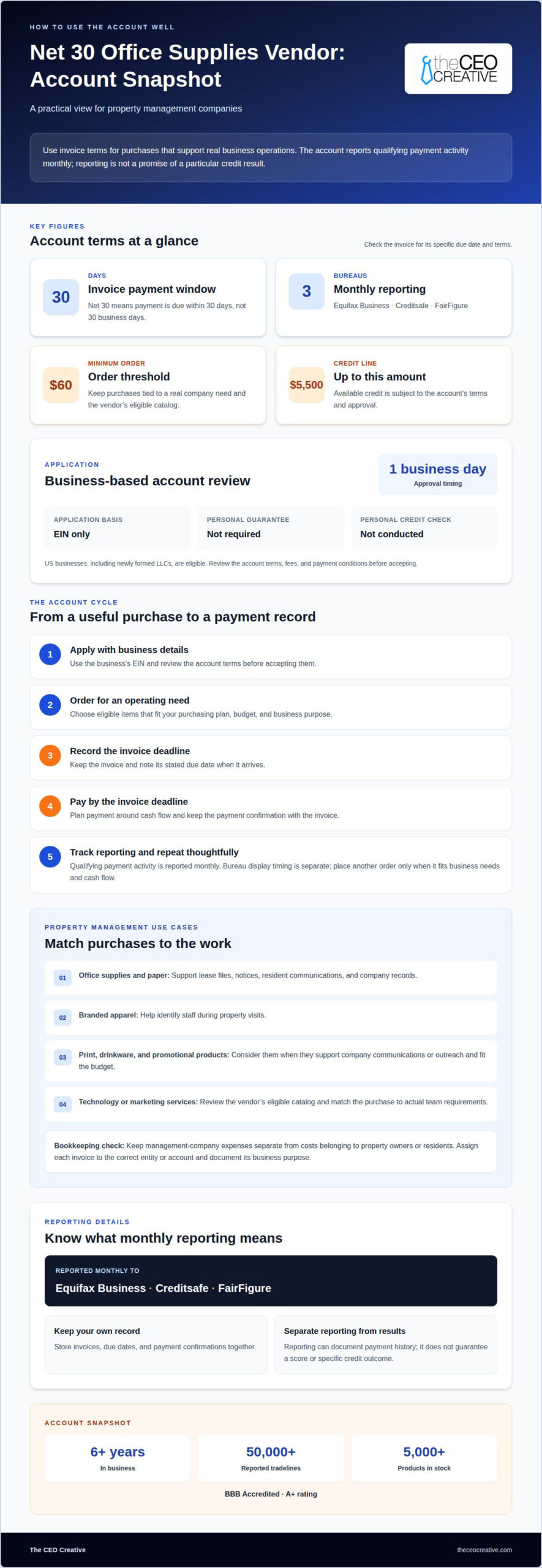
Application requirements vary by vendor. This account uses an EIN-only basis, with no personal guarantee and no personal credit check. Approval is within 1 business day. Review account terms before applying, including fees and payment conditions.
- Apply: Submit the business’s application details using its EIN. Read the account terms before accepting them.
- Keep the purchase connected to a real business need.
- Pay: Use the invoice’s due date as the deadline. Net 30 means 30 days, not 30 business days. Record the due date when the invoice arrives.
- Report: The vendor reports qualifying payment activity monthly. Bureau display timing is separate from the reporting schedule.
- Repeat: Place another useful order only when it fits the purchasing plan and cash flow.
Net 15, Net 30, and Net 60 describe different payment windows. Net 15 allows less time than Net 30, while Net 60 allows more. Compare each deadline with expected cash receipts before choosing terms. For net 30 accounts for property management companies, make sure the payment window fits the business’s actual billing and expense cycles. Follow the terms stated on each invoice.
For an invoice in a foreign currency, check the currency charged, the currency accepted for payment, and any conversion fees before ordering. Record both the invoice amount and the amount paid. This makes reconciliation easier if currency conversion changes the final amount. Confirm that the payment method and currency suit your company’s accounting process.
Compare the account’s eligible purchases, application requirements, reporting process, and payment terms with your regular purchasing routine. Choose terms your business can manage consistently. Organize invoices and schedule payment by the stated deadline to keep a clear account history.
Which Business Credit Bureaus Receive Reports?
Reporting is monthly to Equifax Business, Creditsafe, and FairFigure. A Net 30 vendor’s report can document payment activity, but it doesn’t guarantee a score or a specific credit result. Bureau display timing varies. Keep invoices and payment records so your business can track its own history alongside bureau files.
Before opening an account, identify which bureaus the vendor reports to and whether reporting applies to your account. A vendor’s payment terms alone don’t establish that it reports. Reporting matters because a Net 30 account can contribute to business credit only when payment history reaches a business credit bureau.
- Match the bureau names: Record whether reports go to Equifax Business, Creditsafe, FairFigure, or another bureau.
- Track payment dates: Keep each invoice and payment confirmation together, including the due date 30 days after invoicing when that is the stated term.
- Review existing accounts: For an account already open, determine whether the vendor reports its payment activity and which bureaus receive it.
- Separate cash flow from reporting: Choose orders your business can pay on time, rather than relying on a future credit result.
On-time payments help build a consistent record with a reporting vendor, but they don’t control how a credit bureau evaluates or displays that information. Paying a supplies invoice by its deadline, for example, supports positive payment activity, while the bureau’s file may update on its own schedule. Reporting frequency and bureau display timing are separate.
Are Net 30 vendors available nationwide or only in certain states? Availability depends on each vendor’s eligibility rules. This account is open to US businesses, including newly formed LLCs, with no minimum time in business.
An existing vendor relationship doesn’t guarantee that its payment history appears on your business credit file. Confirm that reporting applies to the account before treating it as a tradeline. If a vendor reports only certain accounts or purchases, eligible activity and timely payment still matter. You may encounter names such as Grainger while researching vendors, but compare each vendor’s reporting policy rather than relying on product category alone.
Treat monthly reporting as one part of building business credit, not a promise of financing approval. Maintain an invoice log, note which bureaus each vendor reports to, and pay according to the invoice terms. This gives your business a clearer record of payment activity and cash flow.
Checklist for Choosing and Using a Net 30 Vendor
Property management companies can choose Net 30 vendors by purchase category, reporting practices, and account terms. An office-supplies vendor may suit recurring administrative purchases, while an apparel vendor may fit staff clothing needs. Use this checklist to assess whether a vendor’s account fits your business and payment process.
- Match the category to an actual expense. List purchases your management company regularly makes, such as office materials, printed documents, or staff apparel. Choose a vendor whose eligible catalog supports one of those needs. Avoid ordering unrelated items solely to create account activity.
- Read the payment terms before applying. Record the invoice deadline, payment method, minimum order, and any account fees or membership conditions. For example, distinguish the order minimum from the credit limit. Include the invoice due date in your accounts-payable calendar.
- Review eligibility for your business structure. Confirm that the vendor accepts your type of US business, including a newly formed LLC if relevant. Note whether the application uses an EIN, requests a personal guarantee, or involves a personal credit check. Keep business information consistent across the application.
- Identify the reporting bureaus. Confirm whether the vendor reports account payment history and which bureaus receive it. For this account, the named bureaus are Equifax Business, Creditsafe, and FairFigure. A Net 30 term alone does not establish that a vendor reports.
- Test the fit against cash flow. Compare the invoice deadline with expected business receipts and scheduled expenses. For example, avoid placing a large recurring order if its due date would compete with payroll or property operating costs. Select an order your company can pay on time.
- Set up a repeatable payment record. Assign each invoice to the correct business entity or property-management operation. Save the invoice, payment confirmation, due date, and vendor name together. Review that record each billing cycle before placing another order.
Build a comparison sheet with a row for each vendor and columns for product category, eligibility, minimum order, fees, payment deadline, and reporting. Base each entry on the vendor’s published account terms, not assumptions about another supplier. This helps you compare vendors for general business purchases without assuming they specialize in property management.
Use the completed checklist to choose accounts that support actual purchases and manageable payments. Consistent records help your team track invoices and payment activity, while credit outcomes depend on how bureaus process reported information.
Common Mistakes When Using Net 30 Accounts
Net 30 accounts can organize vendor purchases, but poor account controls create avoidable problems. For a property management company, tie each order to a business purpose, invoice, payment date, and correct set of books. Watch for these six mistakes.
- Missing the invoice deadline. A Net 30 invoice has a due date. Enter that date in your accounts-payable calendar as soon as the invoice arrives. For example, assign an invoice to a staff member and review it before payment is due. Relying on memory can lead to a missed deadline and disrupt the payment record you intended to establish.
- Assuming credit-building is guaranteed. A vendor account does not promise a particular credit score, profile, or financing decision. Reporting and bureau processing are distinct steps. Treat on-time payment as sound account management, not as a guaranteed outcome or a substitute for other business credit practices.
- Choosing a vendor without confirming reporting. Net 30 terms alone don’t mean the vendor reports payment activity. Before applying, identify the bureaus receiving reports and whether the account’s payment history is included. Otherwise, a business may make timely payments without the reporting activity it expected.
- Mixing company expenses with property expenses. A management company may handle purchases connected to different properties. Record who benefits from each order and assign the invoice to the appropriate business records. For example, separate staff apparel for the management team from materials purchased for a specific property.
- Ordering beyond the operating budget. A payment term postpones an invoice deadline; it doesn’t remove the expense. Compare each planned order with expected receipts and scheduled costs. Don’t use a vendor account for items the company doesn’t need or cannot comfortably pay for by the due date.
- Overlooking the account terms. Check the minimum order, payment instructions, eligibility, and any stated fees before submitting an application. Keep the vendor’s terms with the account records. Don’t assume terms from one supplier apply to another.
Use a consistent review before every order: confirm its business purpose, match it to the correct records, note the invoice deadline, and review the Net 30 account terms. This helps keep vendor activity connected to actual property management operations, rather than creating extra purchases or missed obligations.
The CEO Creative
The CEO Creative is a reporting Net 30 vendor for businesses seeking terms on routine business purchases. For property management companies, its office supplies category can fit administrative needs, while apparel, T-shirts, and embroidery can support staff clothing and business identity. These options connect vendor purchases with the company’s operating needs, rather than requiring a property manager to choose unrelated products.
The CEO Creative’s account is based on the business’s EIN, with no personal guarantee or personal credit check. U.S. businesses, including newly formed LLCs, can apply, with no minimum time in business. This can suit a new property management company building its business credit profile or an established operation adding a reporting vendor.
A business can choose from eligible product categories to match its purchasing plans:
- Office supplies: Business materials for routine administrative work, records, and company operations.
- Apparel: Work clothing for staff who represent the management company.
- T-shirts: A practical branded apparel option for teams or company activities.
- Embroidery: A way to customize eligible apparel with business branding.
One account can serve purchases across these categories, so a property manager can match orders to changing business needs. For example, the company might order office materials for its administrative work and apparel for staff. Choose purchases that are useful and fit the business budget. Net 30 terms still require managing invoices responsibly and paying by each stated deadline.
The CEO Creative’s account may suit a business looking for an EIN-based vendor relationship and eligible purchases across multiple categories. It provides payment reporting, not a guaranteed credit score, bureau display, or financing outcome. Credit results depend on reporting and bureau processes. Keep account records and payment dates organized as part of your regular bookkeeping.
For a property manager comparing vendor accounts, consider whether these categories match real operating expenses and whether the invoice terms fit the company’s cash flow. The CEO Creative offers a direct option for businesses seeking a Net 30 vendor with office supplies and apparel categories under one account.
Visit The CEO Creative’s Net 30 account page for account details.
Put Your Next Vendor Decision to Work
Choosing net 30 accounts for property management companies starts with matching vendor terms to real operating purchases and a payment process your team can maintain. Decide which business expense belongs on the account, who will manage its invoices, and how your team will record each payment. That preparation makes the account easier to manage as purchasing needs change.
The CEO Creative offers a Net 30 apparel vendor, a Net 30 T-shirt supplier, and a Net 30 embroidery supplier. These categories may suit property management businesses purchasing staff apparel or branded clothing. Reporting doesn’t guarantee a particular credit result, so treat timely payments and useful purchases as the core of responsible account use.
Choose a vendor account that fits your business needs, then make invoice tracking part of your routine. A clear process helps your team make deliberate purchasing decisions and manage account activity consistently.
Take the next step with a practical plan for your business, and build on it with each well-managed purchase.
Frequently Asked Questions
What Are NET 30 Accounts?
A NET 30 account lets a business purchase eligible goods or services and pay by invoice later. For The CEO Creative, the balance is due 30 calendar days from shipping, and payments are reported to the major credit bureaus. For example, a property management company might use an eligible office-supplies purchase for its administrative work. Reporting does not guarantee a particular credit score or outcome.
What Are the Eligibility Requirements for NET 30 Vendor Accounts?
U.S. businesses, including newly formed LLCs, can apply for The CEO Creative’s account, with no minimum time in business. The application is based on the business’s EIN. Before applying, enter the correct legal and contact details so the account reflects the entity making the purchases. Eligibility varies by vendor, so don’t assume another supplier uses the same criteria.
Do NET 30 Vendors Require a Personal Guarantee or Credit Check?
Requirements vary by vendor. The CEO Creative’s account is EIN-only, with no personal guarantee and no personal credit check. That means the application is based on the business’s EIN rather than a personal guarantee or personal credit check. Review the specific account terms before applying elsewhere, since one vendor’s application process doesn’t establish the requirements for every NET 30 account.
How Do Property Management Companies Apply for NET 30 Accounts?
Start by choosing an account that matches your company’s eligible purchasing needs. Complete the application with the requested business information, including its EIN for an EIN-based account. After approval, place an eligible order and keep the invoice with your business records. For a property management company, record which entity or operation made the purchase so your team can reconcile the invoice accurately.
How Can a Property Management Company Build Business Credit With NET 30 Accounts?
Use an account with a vendor that reports payment activity, then pay each invoice by its due date. Keep a simple ledger noting the vendor, invoice date, due date, payment date, and business purpose. Reconcile the entries with your bank and bookkeeping records. Timely payments can contribute to reported business credit history, but bureau displays and credit outcomes aren’t guaranteed.