
A laundromat can build business credit through vendor payables while local business customers contribute to its receivables. Net 30 accounts for laundromats let an eligible business purchase from a reporting vendor on invoice terms and pay by the due date, creating an opportunity to establish a record of business payments.
These are separate parts of the operation. A vendor balance is money the laundromat owes, while a commercial customer invoice is money it expects to collect. Tracking both helps owners plan payments, follow up on outstanding invoices, and see how credit-building purchases fit the business’s cash flow.
This guide explains how vendor tradelines work, what a laundromat may purchase on terms, and how the application, purchase, payment, and reporting cycle fits together. It also covers how to organize payables and receivables, avoid common account-management mistakes, and assess whether an EIN-based vendor account suits your business.
Key Takeaways
- Choose net 30 purchases that fit your laundromat’s actual operating needs, such as apparel, office supplies, or branded items.
- Understand the account cycle from application through purchase, payment, and monthly reporting before placing an order.
- Know which business credit bureaus receive reports and allow time for bureau records to display updates.
- Use a simple checklist to organize account details, track invoices, and manage payments.
- Avoid missed due dates and assumptions about guaranteed credit outcomes; payment history alone does not promise a particular result.
What Can Laundromats Order on Net 30 Terms?
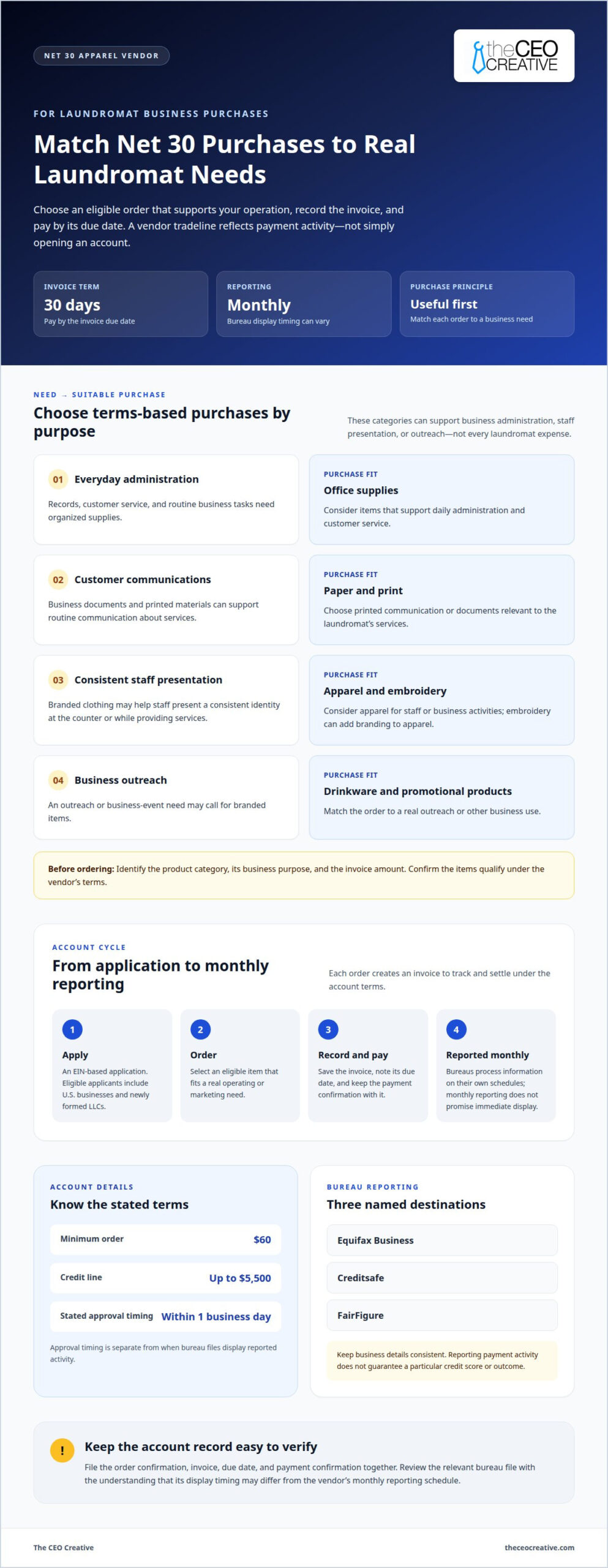
A laundromat can use net 30 vendor terms for eligible business purchases, rather than for every expense in its operation. Relevant categories include office supplies, paper and print, apparel, embroidery, drinkware, and promotional products. Net 30 means the invoice is due within 30 days. The purchase should serve a real business need and fit the account’s terms.
Office supplies can support the administrative work behind a laundromat. For example, owners may use office items to organize records, manage customer service, or handle daily business tasks. A net 30 office supplies vendor is relevant when those purchases match the business’s needs and the vendor’s catalog.
Paper and print purchases can support customer communications and routine business documents. Apparel, including t-shirts, can help staff present a consistent identity at the counter or while providing services. Embroidery can add branding to apparel. These categories may suit a laundromat that needs branded materials, rather than equipment or machine parts.
Drinkware and promotional products offer other options for business use. A laundromat might use branded items for outreach or business events. The key is to match each order to a real operating or marketing need. A vendor tradeline is based on eligible purchases and their payment history, not simply on opening an account.
- Office supplies: Consider items for everyday administration and customer service.
- Paper and print: Choose business documents or printed communication relevant to your services.
- Apparel and embroidery: Consider branded clothing for staff or business activities.
- Drinkware and promotional products: Match the order to outreach or other business use.
Before ordering, identify the product category, business purpose, and invoice amount. Then confirm that the items qualify under the vendor’s terms. For example, an owner who needs branded staff apparel could consider an apparel order, while one handling routine administration may prefer office or paper products.
These categories do not cover every laundromat expense. They offer practical ways to connect business purchases with vendor terms. Keep each order useful, note the invoice due date, and choose items that match the laundromat’s priorities.
How a Net 30 Vendor Account Works
A Net 30 account creates an invoice for an eligible business purchase. The invoice gives the business 30 days to pay. For laundromat owners, net 30 accounts for laundromats can connect useful purchases with a vendor tradeline when the vendor reports payment activity. This is a vendor account, not a loan or business credit card.
The process starts with an application. For an EIN-based account, the business applies using its Employer Identification Number. Eligible applicants include U.S. businesses and newly formed LLCs, with no minimum time in business. This account basis requires no personal guarantee and no personal credit check. It can suit an owner whose business has little or no established credit history. Learn how an EIN-only Net 30 account works.
After approval, the business selects an eligible item and places an order under the account terms. The vendor issues an invoice showing the amount due and payment deadline. Review both, record the invoice in the laundromat’s payables, and schedule payment for the due date. Keep the order confirmation with the invoice so the purchase and balance are easy to trace.
Payment closes the invoice, but reporting is also part of the account cycle. Payment activity is reported monthly, while bureau systems determine when an update appears in a business file. Keep the invoice and payment confirmation with the laundromat’s records. These documents provide a clear reference when reviewing reported account activity.
Repeat purchases should follow the same sequence: choose a useful item, place an eligible order, record the invoice, and pay on time. Net 30 accounts for laundromats can create additional payment history through repeated eligible purchases, but they cannot guarantee a particular credit score or outcome.
Vendors offering net 30 accounts set their own eligible categories, application criteria, reporting practices, and account limits. A laundromat should choose a reporting vendor whose terms and products fit its business purchases. The stated approval timing for this account is within 1 business day. That processing timeframe does not determine when a bureau will display payment activity.
Which Business Credit Bureaus Receive Reports?
Reporting is monthly to Equifax Business, Creditsafe, and FairFigure, the three business credit bureaus named for this vendor account. Knowing where payment activity is sent helps a laundromat owner understand the reporting process and which bureau records to review when tracking the account.
A reported tradeline connects a vendor account with a business credit history. Organize invoices and payment confirmations by billing period. For example, retain the payment confirmation with the invoice it settles. These records help the owner compare account activity with the business file during a review.
Monthly reporting does not mean a bureau will display an update immediately. Equifax Business, Creditsafe, and FairFigure each process information within their own systems. The reporting schedule describes when account information is sent, not when it appears in a bureau record. Keep this distinction in mind when reviewing recent activity.
Use consistent business details across the vendor account and the laundromat’s records. An EIN identifies the business on an EIN-based account. Keep the legal business name and EIN handy when reviewing account documents or bureau files. Consistent records make mismatches easier to spot, and a delayed update does not necessarily mean the vendor failed to report.
- Equifax Business: Receives account reporting monthly.
- Creditsafe: Receives account reporting monthly.
- FairFigure: Receives account reporting monthly.
Review each bureau record separately. If an account appears in one file before another, note the bureau and review date. Compare the displayed business details with the vendor invoice and payment records. Do not assume that an update in one bureau’s file means the other two have displayed the same information.
A practical review routine is to record invoices, due dates, and completed payments each month. Compare these records with Equifax Business, Creditsafe, and FairFigure when reviewing business files. This creates a clear trail of the laundromat’s account history and helps the owner track reporting without expecting an immediate update.
Checklist for Opening and Using a Net 30 Vendor Account
Use this sequence to keep the application, purchase, invoice, payment, and bureau review connected. For owners comparing net 30 accounts for laundromats, a clear process helps make account activity easier to track alongside the business’s regular payables and receivables.
- Gather business details. Have the laundromat’s legal business name, EIN, and business contact information ready. Enter the same details consistently so application and account records identify the same business.
- Review the account terms. Note the eligible purchase categories, payment period, minimum order, credit line, and reporting destinations before applying. Make sure planned purchases fit both the terms and the business’s needs.
- Complete the application. Submit accurate information using the business’s EIN. Newly formed U.S. LLCs are eligible, and there’s no minimum time in business. This account requires no personal guarantee and no personal credit check.
- Choose an appropriate order. Select an item in an eligible category that serves a real business purpose. Review the item details and order total before submitting. Avoid adding unnecessary purchases simply to create account activity.
- Enter the invoice in your records. Record the vendor, invoice amount, date, and due date in the laundromat’s payable system. Keep the invoice with the order confirmation. This makes it easier to match the balance owed with the correct purchase.
- Plan and document payment. Schedule payment according to the invoice terms. After paying, save the confirmation beside the invoice and update the payable record. This creates a traceable record of what was due and when it was settled.
- Review business bureau files. Reporting is monthly, but bureau display timing varies. Review the relevant business records for accurate account details, and compare entries with invoices and payment confirmations. Keep a note of the bureau and review date.
Repeat the process only when another eligible purchase fits the laundromat’s operating needs. Managing net 30 accounts for laundromats this way keeps vendor obligations organized and separates them from amounts customers owe. Retain application details, invoices, payment confirmations, and bureau review notes together. This supports consistent recordkeeping, but it can’t guarantee a particular credit score or financing decision.
Common Net 30 Account Mistakes to Avoid
A vendor account requires sound purchasing and payment habits to support a laundromat’s business records. Common mistakes can lead to avoidable confusion, missed payments, or unrealistic expectations about credit reporting.
- Buying items the business doesn’t need. An order should serve a real operating or branding purpose. For example, choose office items for administration or apparel for staff use. Don’t add unrelated products just to create account activity. Unneeded purchases can strain cash flow without making the account easier to manage.
- Missing the invoice due date. Net 30 terms give a defined payment period, not permission to overlook the invoice. Record each invoice when it arrives, note its due date, and schedule payment with enough time for processing. Keep the payment confirmation with the invoice so the laundromat’s payable records show both the amount owed and how it was settled.
- Assuming a credit result is guaranteed. A vendor tradeline may contribute payment information to a business credit file, but it doesn’t guarantee a score increase, financing approval, or any particular outcome. Treat the account as one part of business credit management. Pay according to the terms and make decisions based on the laundromat’s budget, not a promised result.
- Expecting bureau updates to appear immediately. Monthly reporting and bureau display are different steps. Equifax Business, Creditsafe, and FairFigure process information through their own systems, so an update may not show as soon as an invoice is paid. Keep payment records, note when you review each file, and avoid treating a delay as proof that reporting did not occur.
- Using inconsistent business details. A mismatch in the business name or EIN can make account records harder to compare. Use the same business information on the application and in the laundromat’s bookkeeping. If reviewing a bureau file, compare its displayed details with the vendor account and supporting documents before deciding that an entry is inaccurate.
Build a routine for every invoice: record it, track its deadline, save proof of payment, and review business files periodically. This keeps vendor payables separate from money customers owe the laundromat. It also gives the owner organized records for understanding account activity without assuming a particular credit outcome or immediate bureau update.
The CEO Creative
The CEO Creative offers reporting Net 30 vendor accounts for laundromat owners whose planned business purchases fit eligible categories. Consider an account when your operation has a practical need for office supplies or staff apparel, including t-shirts and embroidered items. The purchase should fit your business, not be made solely to create account activity.
Keep vendor invoices in your payables records, separate from customer receivables. This gives you a clearer picture of how a purchase fits the laundromat’s cash flow. Reported payment activity does not guarantee a particular credit score or financing outcome.
This article provides general information, not financial or legal advice. Contact The CEO Creative about a business Net 30 account.