

Establish business credit by separating business finances, opening accounts that report payment activity, and paying on time. Consistent business details help create a clear credit history.
This guide explains how to build and monitor that history, separate personal and business finances, and understand how credit profiles may factor into financing decisions.
Key Takeaways
- Build a distinct business identity and keep its identifying details consistent across accounts and reports.
- Use vendor terms carefully: place orders your business needs and pay on time to develop a payment history.
- Review business credit reports for inaccurate account details or activity you don’t recognize.
- Score models differ, so review the business credit reports where your vendor account activity is reported.
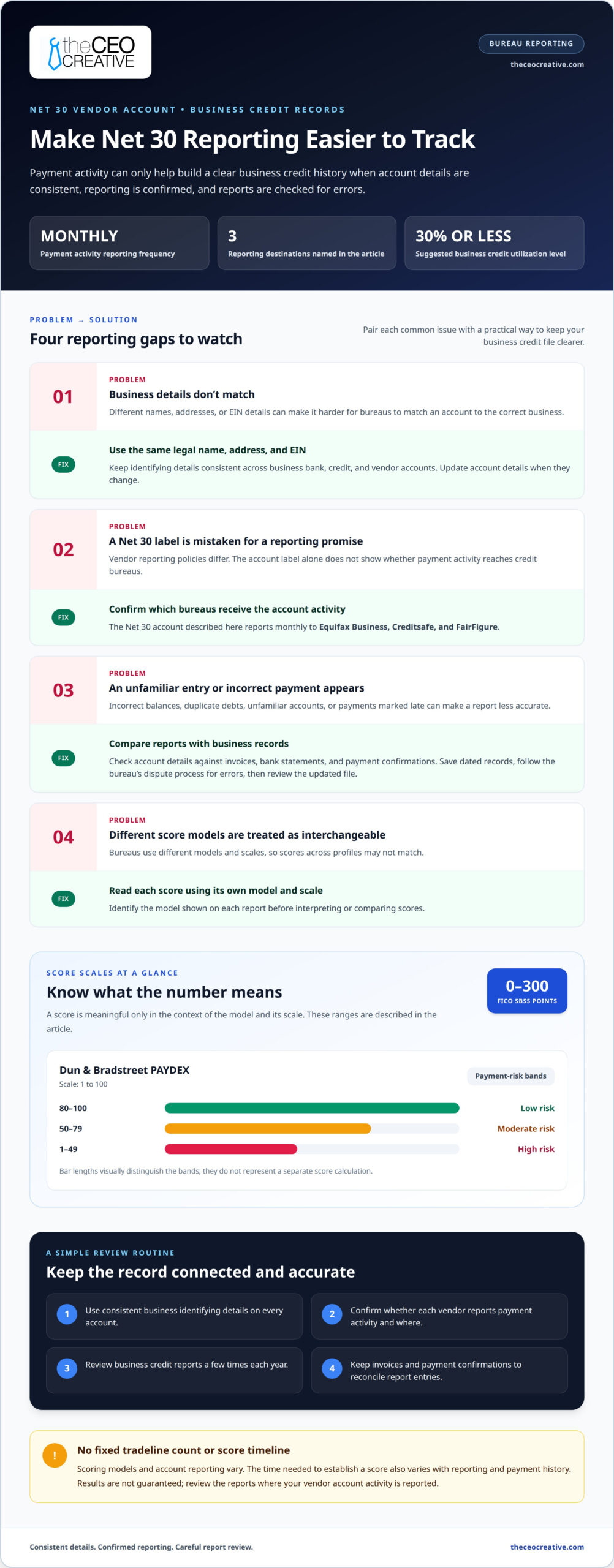
- A Net 30 vendor account reports payment activity monthly to Equifax Business, Creditsafe, and FairFigure.
What Is Business Credit and How Do You Build It?
Business credit reflects a company’s credit history and helps lenders assess its borrowing profile. For businesses preparing to apply for commercial, vehicle, or equipment loans through brokers such as speakingfinance.com.au, maintaining a solid track record is crucial. There is no universal number of tradelines or fixed timeline for building a score: scoring models and account reporting vary.
-
Keep Credit Utilization Low
Keep business credit utilization at 30% or less of available credit. Check each account’s balance against its credit limit, not just the total owed across accounts. High utilization can weigh on a credit score, even when payments are on time. Avoid charging more than the business can repay. A practical starting point for how to establish business credit is to manage available credit carefully.
-
Keep Business Information Consistent
Use the same legal business name, address, and Employer Identification Number (EIN) when opening a business bank account, applying for credit, or setting up vendor accounts. Inconsistent records can make it harder for bureaus to match accounts to the correct business. Review applications before submitting them, and update account details when they change.
-
Maintain Low Balances and Pay on Time
Keep credit card balances low and pay every bill by its due date. Record payment dates in a calendar or bookkeeping system, then review upcoming obligations before making new purchases. A low balance alone does not establish payment history; accounts need reported activity. Avoid missed payments, which can harm your business credit record.
-
Consider Tradelines and Credit-Building Time
To establish business credit, open accounts the business can manage and use them consistently. A tradeline records account payment activity, but no set number is required across all scoring models. The time it takes to establish a score also varies with reporting and payment history. Check whether a vendor reports payments before relying on its account to build credit.
Separating Business and Personal Finances
Separate business activity from personal spending to create clearer financial records and a distinct credit history. An EIN helps identify the business for account and tax purposes.
-
Separate Personal and Business Credit
Apply to the IRS for an Employer Identification Number (EIN), then use it consistently for business accounts. Open a business bank account and route company income and expenses through it instead of mixing transactions with personal spending. Keep invoices, receipts, and account statements with the business’s records. Separating finances helps distinguish company activity from your personal credit history, while consistent identification details help connect business accounts to the right profile.
-
Reduce Reliance on Personal Credit
Review financing terms before applying, especially if your new business has limited credit history. A lender may consider personal credit or request a personal guarantee as part of its application process. These terms can connect business borrowing with the owner’s finances. A vendor tradeline that uses an EIN and does not require a personal guarantee offers a way to build business payment history separately. For example, the Net 30 account with no personal guarantee is based on the EIN only, with no personal credit check.
Business Credit Score Models and Scales
Business credit bureaus use different models, so scores across profiles may not match. Review each model’s scale before interpreting a business credit score.
-
Explore Business Credit Score Models
Identify the model shown on each business credit report before comparing scores. FICO SBSS ranges from 0 to 300 points, with higher scores representing less risk. A score’s meaning depends on the model and its scale, so don’t treat two differently calculated scores as interchangeable. Protect business report access as part of your account security practices.
-
Review Dun & Bradstreet Scores
Check whether your business has a Dun & Bradstreet profile and review its information. A D-U-N-S Number is a unique nine-digit identifier Dun & Bradstreet uses to track a business’s credit score and create its profile. Keep the identifier and business details consistent across records used to match accounts, then check that payment information is linked to the correct company.
-
Understand the PAYDEX Score
Read the PAYDEX score alongside its payment-risk bands. Dun & Bradstreet’s PAYDEX scale runs from 1 to 100: scores of 80 or higher indicate low risk, scores from 50 to 79 indicate moderate risk, and scores of 49 or lower indicate high risk. Use supplier payment records to understand the activity behind the score, rather than viewing the number alone.
Monitoring Business Credit Reports
Review business credit reports from Dun & Bradstreet, Experian, and Equifax a few times each year. Net 30 vendors differ, so choose accounts that report payment activity. A reporting account here sends payment information monthly to Equifax Business, Creditsafe, and FairFigure.
-
Check Reports for Errors and Fraud
Compare each report with invoices, business bank statements, and credit card records. Check the business name, address, and account details as well. Flag unfamiliar accounts, duplicate debts, incorrect balances, or payments marked late despite proof of payment. Save dated statements and correspondence as evidence. If an account appears incorrect, follow the bureau’s dispute process and instructions. Then review the updated file to confirm corrections.
-
Check Which Vendors Report Payments
Ask each supplier whether it reports account payment history, and identify the bureaus receiving reports. Confirm the business name and account details match your records. Reporting policies differ, so a Net 30 label alone doesn’t show whether activity reaches credit bureaus. A vendor may report to Equifax Business but not another bureau. Keep invoices and payment confirmations to reconcile report entries. This record can help lenders review your business credit history and ability to manage credit cards or other accounts.
What You Can Order on Net 30 Terms
A Net 30 vendor account lets an eligible business order items on terms and pay later under the account’s payment schedule. Choose purchases that serve real operating needs, so the order fits your business rather than creating unnecessary spending.
- A Net 30 apparel vendor can support branded clothing needs, including t-shirts and embroidery.
- A Net 30 office supplies vendor offers items for routine workplace use.
- A Net 30 tech and electronics vendor provides a category for business technology purchases.
- A Net 30 drinkware supplier offers branded drinkware, while a Net 30 promotional products vendor covers promotional items.
- A Net 30 paper and print supplier supports paper and print needs. Net 30 marketing and web services are another available category.
Before ordering, match the product category to a planned business expense and check that the items meet the company’s needs. For example, a business preparing branded team apparel could consider custom t-shirts or embroidery; an office furnishing its workspace could choose relevant office supplies. Keep the invoice and payment record with the business’s accounting documents to track the purchase, due date, and payment activity associated with the vendor account. Use the account for purchases the business can repay under its terms, not as a reason to buy unnecessary items. Reported activity can support a credit history, but it does not guarantee a particular score or financing decision.
How the Net 30 Account Works
A Net 30 account follows a repeatable cycle: apply, order, pay by the due date, and build a record of payment activity. Plan each purchase around business needs and the account’s terms.
- Apply. Submit the application with the business’s identifying details. Review the account terms before ordering, including the minimum order and available credit line.
- Place an order. Choose eligible items the business needs. The balance is due 30 calendar days from shipping. Save the invoice so you can track the amount and calculate its due date.
- Pay on time. Add the due date to the company’s bookkeeping system. Pay according to the invoice terms, and retain confirmation with the order record. Timely payments help create an account history.
- Allow reporting. Payment activity is reported monthly to Equifax Business, Creditsafe, and FairFigure. Each bureau controls when updated information appears in its records. Keep payment proof in case an account entry needs review.
- Repeat responsibly. After completing an order and payment cycle, place another planned purchase when it fits the business budget. Track its balance and due date separately. Consistent use and on-time payments create a clearer history than opening accounts without a repayment plan.
Use each billing cycle to record business purchases and payments accurately. Account reporting does not guarantee a particular score or financing result.
Which Business Credit Bureaus Receive Reports
Payment activity from this Net 30 account is reported monthly to Equifax Business, Creditsafe, and FairFigure. Each bureau maintains its own business credit records, so account details may appear differently across reports.
- Equifax Business: Review the business profile for account details and payment history. Compare any listed balance or payment status with your invoices and records.
- Creditsafe: Check that the account is associated with the correct business identity. Consistent business details help distinguish your company’s report from another business’s file.
- FairFigure: Review the account information and payment activity shown in the report. Keep invoices and payment confirmations available to help identify discrepancies.
Monthly reporting describes how often account activity is sent, not when it will appear in a bureau’s records. Each bureau controls its own processing and display timing. If you’ve made a payment but don’t see it reflected yet, retain the dated confirmation and review the report again later. Compare the business name and account details alongside the payment entry before treating a difference as an error. Keep a copy of the account terms with your bookkeeping records; the business Net 30 account details explain the reporting arrangement. Regular report reviews help you track what appears and spot information that doesn’t match your records.
Business Credit-Building Checklist
This sequence helps establish a clear business identity, build reported payment activity, and keep records organized as your credit profile develops.
- Set up the business identity. Obtain an EIN and use the business’s legal name and address consistently on account applications and records.
- Separate company finances. Open a business bank account and use it for business income and expenses. Keep personal transactions separate.
- Organize business documents. Store account applications, invoices, payment confirmations, and bank records together so details are easy to match.
- Select a reporting vendor tradeline. Confirm which business credit bureaus receive payment activity, then choose a vendor account suited to planned purchases.
- Apply with consistent details. Enter the same business information used for your EIN and financial accounts. Review the application for errors before submitting it.
- Use the account responsibly. Order items the business needs, track the balance, and note each invoice’s due date in your bookkeeping system.
- Pay according to the terms. Schedule payment reminders and retain proof of payment. Avoid charges the business can’t repay on time.
- Review business credit reports. Compare reported accounts and payment details with invoices and confirmations. Follow up on entries that don’t match your records.
Repeat the process with deliberate account use and accurate records. A vendor tradeline can add payment history when the vendor reports it, but reporting alone does not determine a business credit score or financing decision.
Common Business Credit-Building Mistakes
Avoid these errors to keep vendor terms manageable and business credit records accurate. Review each account before applying, ordering, or paying.
- Applying for too many accounts at once. Multiple applications can create hard inquiries and make balances harder to manage. Add accounts only when they serve a clear business need.
- Mixing personal and business spending. Paying a company invoice from a personal account can blur records. Use a business bank account and keep supporting receipts with company statements.
- Assuming every vendor reports. Net 30 terms alone don’t guarantee reporting. Confirm which bureaus receive payment activity, and keep the vendor’s reporting details with the account records.
- Using too much available credit. Keep utilization at 30% or less. Compare each account balance with its credit limit, and avoid adding charges that push usage higher.
- Missing a payment due date. A late payment can weaken the history you’re building. Record invoice deadlines in bookkeeping software or a calendar, then schedule payments with enough time to process.
- Entering inconsistent business details. Variations in a legal name, address, or EIN can interfere with matching accounts to a business profile. Use the same identifying information on vendor applications and financial records.
These habits make account activity easier to manage and review. Compare business credit reports with invoices and payment confirmations so errors do not go unnoticed.
The CEO Creative: Business Credit Vendor
The CEO Creative is a business credit vendor for businesses seeking a vendor tradeline alongside purchases they already plan to make. Its Net 30 apparel, t-shirt, and embroidery offerings give companies practical categories to consider while building a business payment history.
Choose an apparel purchase that serves an existing need, such as clothing for a team or business use. A Net 30 t-shirt supplier can fit a planned t-shirt order, while a Net 30 embroidery supplier can suit a business that needs embroidered apparel. The account is a better fit when the order aligns with your operations and you can pay according to its terms.
A new LLC can apply using its business EIN, with no personal guarantee or personal credit check. Payment activity is reported monthly to Equifax Business, Creditsafe, and FairFigure. Bureau records update on their own schedules, so reporting does not promise a particular score or financing decision.
Before applying, consider whether custom apparel or embroidery is a useful purchase for your business, and plan how you will track the invoice and due date. Use vendor terms for planned spending, pay on time, and keep records with your business accounts. This supports an organized approach to building business credit without treating a tradeline as a guaranteed result.
Contact The CEO Creative to discuss the Net 30 business account.
Frequently Asked Questions
What are the steps to establish business credit in the United States?
To establish business credit, first create a distinct business identity and obtain an EIN. Use consistent legal details for a business bank account and credit applications. Then choose an account that reports payment activity, use it for planned business purchases, and pay by each due date. Keep invoices and payment records, then review business reports to confirm the account information matches.
What documents and business details are needed to apply for an EIN and business credit?
Use the business information requested by the IRS when applying for an EIN. For a vendor or financing application, have the EIN, legal business name, address, and business contact details ready. Keep formation and banking records accessible in case an application requests them. Requirements vary by application, so provide the requested records and ensure the business name and address match across documents.
How do I register a business and open a business bank account to build credit?
Complete the registration that applies to your business structure, then obtain an EIN and use it when setting up a business bank account. Keep business income and expenses in that account instead of mixing them with personal transactions. Registration requirements depend on the entity and location. This is general information, not legal or financial advice; follow the applicable official process for your business.
Which business credit bureaus track business credit scores, and how do their scoring models differ?
Equifax, Experian, and Dun & Bradstreet maintain business credit information, and other bureaus may also hold business profiles. Their scoring models use different scales and measures, so scores from separate bureaus are not directly interchangeable. For example, PAYDEX focuses on payment patterns, while FICO SBSS is a separate business scoring model. Identify the bureau and model before interpreting a score.
What are the costs and eligibility requirements for business credit cards, loans, and vendor accounts?
Costs and eligibility depend on the specific lender, product, and account terms; there isn’t one standard amount or qualification rule for all options. The CEO Creative offers a reporting Net 30 vendor account to U.S. businesses, including newly formed LLCs, with no minimum time in business. Its account is not a business credit card or a loan. Review the terms for the product you’re considering before applying.
How can I separate personal and business finances and avoid using a personal guarantee?
Use a business bank account for company transactions, keep business records separate, and apply for accounts using the business’s EIN. A personal guarantee is a separate term that may connect an owner to a business obligation, so review each application’s agreement before accepting it. The CEO Creative’s Net 30 account uses the EIN only and does not require a personal guarantee or personal credit check.
What mistakes or risks can damage business credit, and how can I monitor or dispute errors?
Late payments, high balances, inconsistent business details, and unfamiliar accounts can create problems in a credit profile. Compare report entries with invoices, bank records, and payment confirmations. If an account or balance is unfamiliar, save relevant records and use the bureau’s dispute process to report the discrepancy. Keep copies of your submission and supporting documents so you can track the issue.
How do I get a DUNS number and establish a business credit profile with Dun & Bradstreet?
U.S. businesses can obtain a D-U-N-S Number for free. Dun & Bradstreet uses this unique identifier to create a business profile. Keep your business details consistent and review the profile’s payment information.