

Net 30 accounts for coffee shops let eligible businesses buy products from a vendor and pay the invoice under its stated terms. The CEO Creative offers Net 30 vendor accounts for eligible purchases such as drinkware, apparel, stationery, and office supplies, with monthly reporting to Equifax Business, Creditsafe, and FairFigure.
Before applying, match the account to a planned business purchase. Check that the product fits your shop’s needs, the order meets the $60 minimum, and the invoice due date fits your payment routine. Vendor terms can support organized purchasing and reported payment activity, but they do not guarantee a particular credit result.
This guide explains what a coffee shop can order, how the account works from application through reporting, and how to manage invoices and records. Credit outcomes vary, and bureau display timing is controlled by each bureau.
Key Takeaways
- Match vendor-term purchases to genuine shop needs, such as eligible drinkware, apparel, stationery, and office supplies.
- Net 30 accounts for coffee shops are vendor accounts for eligible purchases, not loans, bank accounts, or business credit cards.
- The process is straightforward: apply, place an eligible order, pay by the invoice due date, and allow for monthly reporting.
- The minimum order is $60, and the credit line is up to $5,500. Do not order products you do not need just to create account activity.
- Keep purchase and payment records. Reporting does not guarantee a particular credit outcome or bureau display timeline.
What Net 30 Accounts for Coffee Shops Can Help You Buy
A Net 30 vendor account lets a business purchase eligible products and pay according to the vendor’s invoice terms. For a coffee shop, net 30 accounts for coffee shops can suit planned purchases related to branding, staff apparel, and office work. The account applies to eligible catalog items, not every expense involved in running a cafe.
Think of it as an invoice arrangement with a supplier. You order eligible products, receive an invoice, and pay by its due date. It is not a bank account, loan, or business credit card, and it does not automatically cover unrelated bills or expenses.
Which coffee shop purchases may fit vendor terms?
Start with items the business has a clear reason to buy. Branded drinkware can support a consistent customer-facing identity, while promotional products can carry the shop’s branding beyond the counter. The Net 30 promotional products vendor page covers eligible promotional purchases on vendor terms.
Apparel may suit a team’s day-to-day needs, while stationery and office supplies can support routine administration. Consider each order separately: is the item an eligible catalog purchase, and does the shop have a genuine use for it? Avoid treating a product category as a reason to buy something the business does not need.
These examples illustrate how to connect a purchase to an operating need. Eligibility applies to the items in the vendor’s catalog, so plan around the products available for purchase rather than assuming that every item in a broad category qualifies.
What Net 30 means for a coffee shop
Net 30 generally refers to an invoice payment term with payment due within the vendor’s stated 30-day period. The invoice terms govern each purchase, so read the due date and payment instructions when you place an order. For background on the term, see this overview of Net 30 payment terms.
The payment schedule can help a shop plan when to pay for an eligible vendor order. It does not make the purchase free or remove the obligation to pay. Save the invoice, record its due date, and order only what the business can manage under the stated terms.
Keep vendor purchases separate from other operating costs. Ingredients, rent, payroll, and utilities are coffee shop expenses, but they are not automatically eligible catalog purchases. Net 30 is a way to buy qualifying goods from a supplier on stated terms, not a way to pay the cafe’s full operating budget.
How a Coffee Shop Net 30 Account Works From Application to Reporting
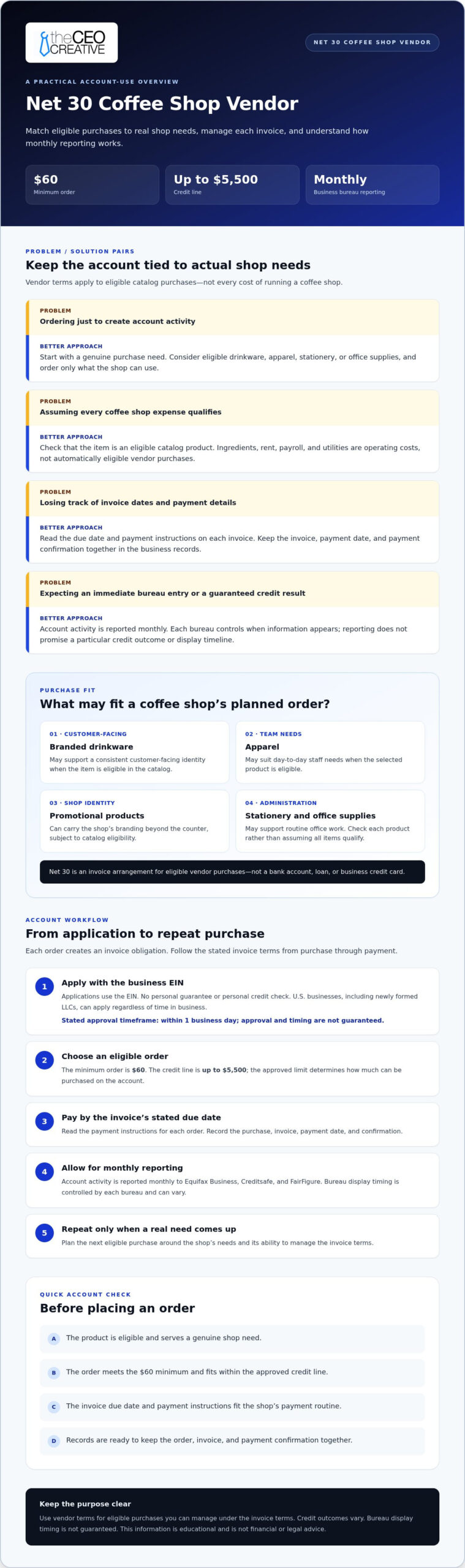
The process is apply, place an eligible order, pay the invoice by its due date, allow for monthly reporting, and repeat when another suitable purchase comes up. Understanding each step helps owners use net 30 accounts for coffee shops as vendor accounts, not general financing, and plan purchases around the shop’s cash flow.
Application and ordering details
Applications use the business EIN, with no personal guarantee or personal credit check. U.S. businesses, including newly formed LLCs, can apply regardless of time in business. The stated approval timeframe is within 1 business day, but approval and timing are not guaranteed.
The minimum order is $60, and the credit line is up to $5,500. Your approved limit determines how much you can purchase on the account. Build an order around a real business need and the available credit, rather than treating the full limit as a spending target.
Payment, reporting, and repeat use
Follow the due date and payment instructions on each invoice. Record the order, invoice, payment date, and payment confirmation in your business files. Keeping these details together makes it easier to track what the shop bought and how the invoice was paid.
- Apply. Submit the business application using the EIN.
- Order. Choose eligible catalog items and keep the $60 minimum and available credit line in mind.
- Pay. Pay by the invoice’s stated due date and retain the payment record.
- Allow for reporting. Account activity is reported monthly to Equifax Business, Creditsafe, and FairFigure.
- Repeat with purpose. Order again when a genuine business need arises, then manage the new invoice in the same way.
Monthly reporting does not mean a tradeline will appear immediately. Each bureau controls how and when information is displayed, so display timing can vary. Credit outcomes vary as well. A reported payment is not a guaranteed score increase or a promise of future credit access.
Net terms can help a business plan the timing of eligible purchases and payments. The Small Business Administration discusses conserving business cash flow with Net 30, but vendor terms still require careful invoice management.
Use vendor credit only for purchases you can manage under the invoice terms. Results vary. This information is educational and is not financial or legal advice.
How to Compare Coffee Shop Net 30 Accounts Without Confusing the Options
Compare vendor accounts based on what your coffee shop can buy, how invoices are handled, and whether payment activity is reported to business credit bureaus. These are terms for eligible vendor purchases, not banking features. Focus on how the account fits the shop’s actual purchasing routine.
Check purchase fit before account terms
Make a short list of purchases the shop expects to make. Branded drinkware, team apparel, stationery, and office products may suit customer-facing or administrative needs when they are eligible catalog items. Separate planned purchases from orders made only to create account activity. Buying unnecessary products adds expense without guaranteeing a credit benefit.
Use the same questions to assess the account’s fit: does the catalog include products the business needs, and can the shop manage the invoice under its stated terms? A coffee shop’s purchasing needs may differ from those of another hospitality business. Choose based on the planned purchases, not just the industry label.
Compare reporting and payment expectations
Look beyond a general statement that an account reports. Identify the named business credit bureaus and reporting frequency, then review the payment process. The CEO Creative reports monthly to Equifax Business, Creditsafe, and FairFigure. Bureau display timing and credit outcomes vary, and a reported tradeline does not guarantee credit growth or future approvals.
Vendor terms are invoice-based: a purchase creates an invoice with a stated due date. That differs from a revolving account structure, where a balance may be carried under separate account terms. A vendor tradeline relates to purchases from that supplier; it is not a general-purpose banking product.
The table summarizes this account’s terms and gives coffee shop owners a practical set of points to review when deciding whether the account fits their planned purchases.
| Comparison point | What to evaluate | This vendor account |
|---|---|---|
| Eligible purchase fit | Whether planned catalog items fit your shop’s real needs | Eligible purchases can include drinkware, apparel, stationery, and office products |
| Minimum order | The smallest order that can be placed on terms | $60 |
| Credit line | The maximum available account limit, subject to approval | Up to $5,500 |
| Reporting | Named bureaus and reporting frequency | Monthly to Equifax Business, Creditsafe, and FairFigure |
| Payment process | Invoice due date and payment instructions | Pay according to the invoice’s stated terms |
For owners comparing net 30 accounts for coffee shops, a good fit means eligible products serve a genuine business purpose and the invoice process works with the shop’s payment routine. Treat reporting as one account feature, not a promise of a particular credit result.
A Coffee Shop Checklist for Using Net 30 Terms Responsibly
A repeatable routine can help a coffee shop manage vendor invoices without treating a Net 30 account as a shortcut to a credit result. Use this checklist to connect each order to a business need, track the invoice, and keep useful records. The goal is responsible purchasing and payment, not spending more to create account activity.
Before placing an order
Start with the purpose of the purchase. Does it support the shop’s branding, team, or workspace? Confirm that the items are eligible catalog products, the order meets the $60 minimum, and the purchase fits within the available credit line. Keep the business name and EIN details consistent in account records so applications, orders, and payment documents refer to the same business.
- Identify the need. Write down what the shop needs and how it will be used before browsing eligible products.
- Check the order. Confirm the items fit a real business purpose and that the order meets the $60 minimum. Do not add unnecessary products just to reach the threshold.
- Review available credit. Keep the planned purchase within the available account limit and consider whether the invoice fits the shop’s payment schedule.
- Save the order details. Keep the order confirmation and invoice with your business records so you can match the purchase to its payment.
- Track and pay the invoice. Record the stated due date, schedule payment according to the invoice terms, and save proof of payment.
- Review business credit files periodically. Look for account information without assuming when a bureau will display monthly reporting.
After the invoice arrives
Make the due date visible in the system you already use to manage business payments. A calendar reminder or bookkeeping task can help prevent an invoice from being overlooked during a busy service week. After paying, match the payment record to the invoice and order. Keep the documents together for clear bookkeeping and later reference.
Net 30 accounts for coffee shops may report account activity, but bureau display timing varies. Review business credit files periodically and do not assume a recent payment will appear immediately.
Common mistakes to avoid
- Missing the invoice due date. Do not rely on memory. Record the due date when the invoice arrives.
- Over-ordering. Avoid buying products the shop does not need just to create a transaction.
- Assuming reporting is instant. Monthly reporting and bureau display are separate steps.
- Expecting guaranteed results. A reported tradeline does not promise a score change or future approval.
- Keeping incomplete records. Save the order, invoice, and payment documentation together.
Results vary. This information is educational and is not financial or legal advice.
The CEO Creative Net 30 Account for Coffee Shop Purchases
The CEO Creative’s Net 30 account can support coffee shop purchases when an order matches an eligible catalog category and a genuine business need. Options include drinkware, apparel, stationery, and office supplies. A shop might plan an order for branded customer-facing items, team apparel, or administrative supplies, then manage the invoice according to its stated terms.
The account has a $60 minimum order and a credit line of up to $5,500. Applications use the business EIN, with no personal guarantee or personal credit check. This is a vendor account for eligible purchases, not a general source of funds for cafe expenses. The stated approval timeframe is within 1 business day, but approval and timing are not guaranteed.
Account details coffee shop owners should remember
U.S. businesses, including newly formed LLCs, can apply regardless of time in business. The account reports monthly to Equifax Business, Creditsafe, and FairFigure. Reporting does not guarantee that a bureau will display a tradeline by a particular date, lead to a score change, or result in future approval. Credit outcomes vary.
The CEO Creative is BBB Accredited with an A+ rating and has been in business for more than 6 years. When assessing fit, start with the planned purchase: does it belong to an eligible category, serve the coffee shop, and fit within the account terms? An order should make sense for the business even apart from any possible reporting effect.
For example, a shop can plan a qualifying order around a genuine need for branded drinkware or office products, note the invoice due date, and retain the order and payment records. Do not buy products the business does not need simply to create an account transaction. A vendor tradeline may contribute to business credit history, but results vary and no particular credit outcome is assured.
Take the next step
Review the business Net 30 account details and application requirements. The account may suit coffee shop owners who want to manage a real vendor purchase under stated terms while establishing a business credit history through reported account activity.
This article is for general information only and is not financial or legal advice. Consider your planned purchase, invoice obligations, and recordkeeping process before using vendor terms.
Make Your Next Purchase Part of a Clear Plan
Credit-building works best as part of steady business administration, not as a reason to spend. Choose a future purchase that fits the coffee shop’s plans, make room for its invoice in your payment routine, and keep a clear record of the transaction. That approach helps you use net 30 accounts for coffee shops with purpose while keeping attention on the needs of the business.
When you are ready, review the account application and decide whether its terms fit your next eligible purchase.
Build your business systems one thoughtful step at a time.
Frequently Asked Questions
Can a coffee shop use a Net 30 account to buy coffee beans or food inventory?
Do not assume coffee beans or food inventory qualify. Net 30 vendor terms apply to eligible products in the vendor’s catalog. The categories discussed here include drinkware, apparel, stationery, and office supplies. Treat a bean restock as a separate purchasing need, rather than expecting a vendor account for branded or administrative products to cover it.
Does a Net 30 vendor account guarantee that a coffee shop will build business credit?
No. A vendor account can report payment activity, but that does not guarantee a business credit file will change, a score will rise, or a future application will be approved. For net 30 accounts for coffee shops, consider reporting one part of a broader credit history, not a promised result. Keep business records accurate and pay invoices according to their terms.
How long does it take for a monthly Net 30 tradeline to appear on a business credit file?
There is no guaranteed display date. Monthly reporting describes how often account information is sent, not when a bureau will match it to a business file or display it. If you are checking for a tradeline, make sure your business identity details are consistent in your records and review the relevant file periodically. A delay in display does not by itself explain why an item is absent.
Is a Net 30 vendor account the same as a business credit card?
No. A Net 30 vendor account is tied to purchases from that supplier, with payment due under the invoice terms. It is not a general-purpose payment account. An invoice for eligible branded items is a supplier transaction; everyday purchases elsewhere are not automatically charged to that vendor account. Keep the account’s purchasing scope and invoice obligations clear in your bookkeeping.
Can one Net 30 account be used for more than one product category?
One account can support purchases across eligible categories when the vendor’s account and catalog allow them. That can let a coffee shop manage different planned needs through one supplier account instead of treating every category as a separate credit product. Eligibility still applies to each order. Choose eligible catalog items that have a genuine business use.
What should a coffee shop do if it cannot pay a Net 30 invoice by its due date?
Review the invoice and payment terms promptly, then contact the supplier before the due date to explain the situation and ask about available options. Do not assume an extension or altered terms have been granted unless the supplier confirms them. Keep a record of any communication and payment arrangement, and update bookkeeping records to reflect the agreed terms.