

Could a Net 30 vendor account let you give your own customers 30 days to pay? Not by itself. If you’re researching how to offer net 30 terms to customers, first distinguish customer credit from a reporting vendor account. One lets your buyers pay you later; the other gives your business payment terms on eligible purchases from a supplier.
It’s reasonable to look for ways to build business credit without taking on unnecessary personal exposure. The CEO Creative’s account is based on your EIN, with no personal guarantee or personal credit check. Approval is not guaranteed. This article explains who receives the terms, how the account works, and what monthly bureau reporting does and does not mean for your credit profile.
You’ll also review the apply, order, pay, report, and repeat process, then check account details before applying. These include the $60 minimum order, a credit line of up to $5,500, and the fact that reporting doesn’t guarantee a tradeline display or a particular credit result.
Key Takeaways
- Separate supplier Net 30 terms from customer credit. A vendor account applies to your business purchases, not invoices you issue to customers.
- Follow the apply, order, pay, report, and repeat process. Check the $60 minimum order and credit line of up to $5,500 before ordering.
- Before applying, confirm eligibility, payment due dates, and reporting details so you can decide whether the account suits your business.
- Use this guide to understand how a vendor account relates to offering Net 30 terms to customers, and what it cannot do for your customer payment policy.
- Keep records and pay as agreed. Treat monthly reporting as one part of a broader credit-building approach, not a guaranteed credit outcome.
Net 30 Vendor Terms: Buying on Credit or Offering Customer Credit?
A reporting Net 30 vendor account gives your business payment terms as the buyer for eligible purchases from a supplier. It doesn’t give you terms to pass on to your own customers. The two arrangements involve different parties, invoices, and responsibilities.
What does Net 30 mean for a business buyer?
Net 30 generally means payment is due within a 30-day period, but the agreement determines how that period is calculated. Check the account terms and invoice for the due date rather than assuming every vendor starts counting from the same event.
With supplier terms, your business places an eligible order, receives an invoice, and owes payment according to the agreement. This is a form of trade credit. A reporting vendor account also submits payment information to specified business credit bureaus. Reporting doesn’t guarantee that a tradeline will appear or change your credit profile. Review the Net 30 vendor account details to understand the account’s terms.
Can a vendor account let you offer terms to your customers?
No. Buying on supplier terms and extending credit to customers are separate arrangements. A vendor account governs what your business owes its supplier. If you invoice your own customers with delayed payment terms, your business is the seller and the customer owes you.
That distinction matters when considering how to offer net 30 terms to customers. A reporting vendor account doesn’t make that decision for you or manage customer invoices. Customer credit decisions require a separate process suited to your business and its needs.
| Arrangement | Who extends terms? | Who owes payment? | What it’s for |
|---|---|---|---|
| Supplier Net 30 | The vendor | Your business | Paying for eligible business purchases under the account agreement |
| Customer Net 30 | Your business | Your customer | Allowing a customer to pay your invoice later under terms you set |
Keep the direction of payment clear. Vendor terms may support purchases and contribute to a broader business credit-building approach, while customer terms affect your own receivables. Neither arrangement guarantees a particular credit result or protects you from unpaid customer invoices.
If you’re comparing payment windows on supplier accounts, review the Net 15 payment terms information separately. Confirm the current agreement and due date before ordering.
How a Reporting Net 30 Vendor Account Works
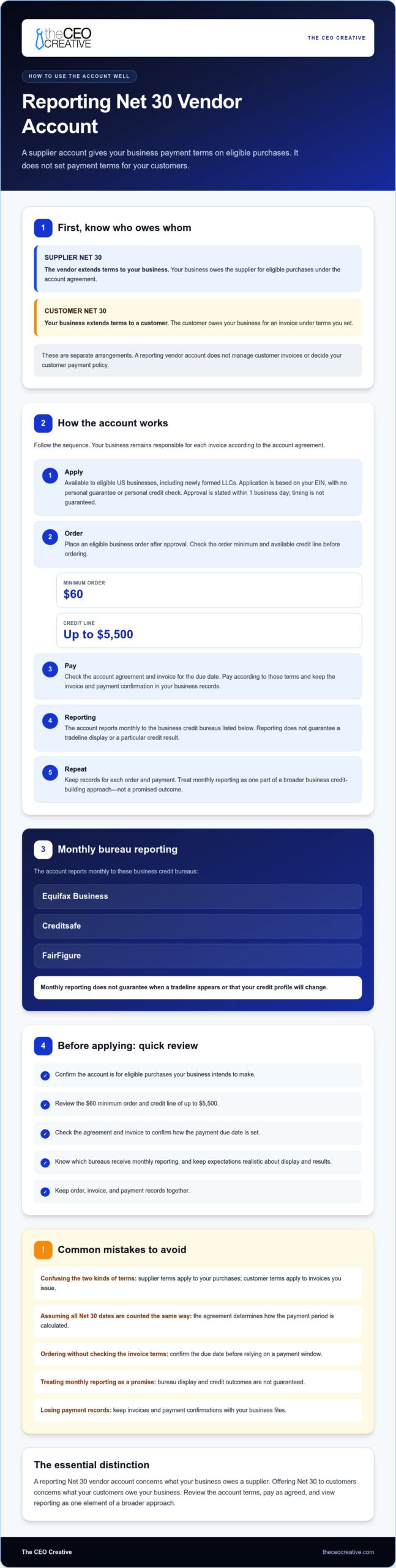
A reporting Net 30 vendor account follows a clear sequence: apply, order, pay, report, and repeat. Each step matters. The account is for eligible business purchases from a supplier, and your business remains responsible for paying each invoice under the account agreement.
- 1. Apply. The account is available to eligible US businesses, including newly formed LLCs, with no minimum time in business. The application is based on your EIN, with no personal guarantee and no personal credit check. Approval is stated to take place within 1 business day, but that timing isn’t guaranteed.
- 2. Order. After approval, place an eligible business order. The minimum order is $60, and the credit line is up to $5,500. For example, a business that needs supplies for its workspace can review the Net 30 office supplies vendor category.
- 3. Pay. Check the account agreement and invoice for the payment due date. Pay according to those terms, and keep the invoice and payment confirmation with your business records.
- 4. Reporting. The account reports monthly to Equifax Business, Creditsafe, and FairFigure. Monthly reporting doesn’t guarantee when a bureau will display a tradeline or whether it will appear on a particular business file.
- 5. Repeat. If you need another eligible purchase, review your available credit and the account terms before ordering. Consistent, on-time payment can be part of a broader business credit-building approach, but credit results vary.
What happens after application and ordering?
The account connects a business purchase to an invoice your company must pay. Use it for eligible needs rather than placing an order solely to pursue a credit outcome. Net terms may help a business conserve business cash flow by separating the purchase from its payment date, but the invoice remains an obligation. If you’re evaluating how to offer net 30 terms to customers, remember that this supplier workflow doesn’t establish payment terms for your own buyers.
Which business credit bureaus receive monthly reporting?
The CEO Creative states that it reports monthly to Equifax Business, Creditsafe, and FairFigure. Reporting is one part of the account process, not a promise of bureau display or a specific score change. Each bureau controls how and when information appears. Review current account details before applying, including the reporting Net 30 vendor account details.
How to Evaluate Net 30 Terms Before You Apply
Compare the account with purchases your business already expects to make. A reporting Net 30 vendor account should fit your operating needs and payment plan. It shouldn’t be a reason to spend on products you don’t need to pursue a possible credit outcome.
Which terms and account details should you compare?
Use this checklist before applying. Confirm the details in the current application and account disclosures before ordering.
- Eligibility: Check which businesses may apply. The CEO Creative states that eligible US businesses, including newly formed LLCs, can apply, with no minimum time in business.
- Application basis: Confirm whether the account is based on your EIN and whether it requires a personal guarantee or personal credit check.
- Minimum order: The stated minimum order is $60. Make sure your planned purchase meets it and serves a real business need.
- Available credit line: The stated credit line is up to $5,500. Check the amount offered to your business rather than assuming you’ll receive the maximum.
- Payment terms: Read the agreement and invoice carefully. Identify the due date and how the payment window is calculated before placing an order.
- Products and reporting: Check that eligible products fit your needs. The CEO Creative states that it has 5,000+ products in stock. Verify the reporting destinations and monthly frequency against current account disclosures. Reporting doesn’t guarantee a bureau display or credit result.
Focus on the terms that affect your decision, not simply the size of a stated credit line or the number of products listed. A suitable account should support planned business purchases without encouraging unnecessary spending.
How do vendor terms differ from customer payment policies?
Supplier terms set when your business pays a vendor for purchases. Your customer payment policy sets how and when your own customers pay your business. A vendor account doesn’t create customer terms or decide whether you should invoice a buyer on Net 30. That’s a separate business policy to consider based on your needs.
If you’re comparing supplier payment windows rather than deciding how to offer Net 30 terms to customers, review Net 15 payment terms as a distinct option. This information isn’t financial or legal advice.
Net 30 Account Checklist and Common Mistakes
A simple routine can help you manage a reporting Net 30 vendor account responsibly. Use this checklist before applying and each time you place an order. Account reporting may be part of a broader business credit-building approach, but it doesn’t guarantee a tradeline display or a specific credit outcome.
A practical checklist for responsible account use
- Verify your business details. Check that the legal business name and EIN information you provide are accurate and consistent with your records.
- Review the account terms. Confirm the payment rules and how the due date is determined before ordering.
- Plan a needed purchase. Choose eligible products that serve a real business purpose. The minimum order is $60, so make sure the planned order meets it without adding unnecessary items.
- Track the due date. Once you receive an invoice, record its due date and set a reminder based on the terms.
- Pay as agreed. Follow the payment instructions in the account agreement and invoice. Keep confirmation of payment.
- 6. Keep records. Save the application details, order information, invoices, payment records, and relevant account disclosures together. Maintaining organized documentation ensures smooth cash-flow tracking and makes it easier to coordinate with accountancy providers like Mazuma to keep business filings and compliance stress-free.
Mistakes that can create avoidable confusion
- Ordering without a business need. Don’t spend just to create account activity. Start with planned purchases your business can use.
- Overlooking the minimum. The minimum order is $60. Check the order total before checkout rather than assuming a smaller purchase will qualify.
- Missing the invoice due date. Don’t rely on memory. Use the date stated in the invoice and account terms to schedule a reminder.
- Expecting immediate bureau display. Reporting is monthly, but bureau display timing can vary. Don’t assume a tradeline will appear on a fixed date.
- Expecting a guaranteed score change. Reporting doesn’t promise a particular credit result. Avoid ordering solely to pursue a specific score outcome.
- Confusing supplier terms with customer credit. A vendor account isn’t a business credit card, loan, or customer-payment platform. Offering Net 30 terms to your customers requires a separate policy and process.
Use the account for eligible purchases, follow its terms, and keep a clear record of each transaction. These habits help you manage the supplier relationship without treating bureau reporting as a guaranteed result. For businesses looking to establish sound financial oversight and structured bookkeeping routines, accounting and advisory specialists like samiospartners.com.au provide helpful guidance on cash flow and accounts management.
Is The CEO Creative’s Reporting Net 30 Account a Fit?
The account may fit eligible US businesses that plan to buy business products from a vendor and want monthly payment reporting as one part of a broader business credit-building approach. It is not designed to give you a way to offer Net 30 terms to your own customers. Results vary, and reporting does not guarantee a tradeline display or a particular credit outcome.
Who may find the account relevant?
US businesses, including newly formed LLCs, may find the account relevant if they have planned purchases in eligible categories such as apparel, office supplies, or promotional products. The stated minimum order is $60, and the credit line is up to $5,500. The application is based on the EIN, with no personal guarantee and no personal credit check. Review current eligibility and account terms before applying.
The CEO Creative states that the account reports monthly to Equifax Business, Creditsafe, and FairFigure. It also states that it is BBB Accredited with an A+ rating and has been in business for 6+ years. These details can help you assess the supplier, but they do not promise approval or a specific credit result.
This is a vendor account for business purchases. It is not a loan or business credit card, and it does not set up customer invoices or extend credit to your buyers. If you’re researching how to offer net 30 terms to customers, that requires a separate customer payment policy and decision process.
What should you do next?
Before applying, check that your business details are accurate, the products meet a real business need, and you understand the order minimum and invoice due date. Confirm current account terms, eligibility, and reporting details in the application materials. Approval is stated to occur within 1 business day, but that is not a guaranteed timeline. Bureau display timing and credit outcomes can vary.
Review the business Net 30 account details before deciding whether to apply.
How to Offer Net 30 Terms to Customers: Choose the Right Setup
A reporting vendor account and customer payment terms serve different purposes. Supplier terms apply to eligible purchases your business makes. They don’t let you extend credit to your own customers. If you’re researching how to offer net 30 terms to customers, treat that as a separate business policy from choosing a supplier account.
Before applying, check that the account fits purchases you already need, review the agreement, and note each invoice due date. The CEO Creative states a $60 minimum order, a credit line up to $5,500, and monthly reporting to Equifax Business, Creditsafe, and FairFigure. It is BBB Accredited with an A+ rating. Reporting doesn’t guarantee a tradeline display or a particular credit result, and outcomes vary.
Make your next step a careful review of the current eligibility requirements and account terms. A clear purchase and payment routine can help you manage the supplier relationship with confidence.
Keep building your business with informed decisions and terms you understand.
Frequently Asked Questions
Can I use a Net 30 vendor account to offer terms to my customers?
No. A Net 30 vendor account gives your business payment terms for eligible purchases from a supplier. It doesn’t set up payment terms for your own customers. If you’re researching how to offer net 30 terms to customers, treat that as a separate business policy and process. With a vendor account, your business is the buyer and is responsible for paying the supplier’s invoice according to the account agreement.
How does a reporting Net 30 vendor account work?
You apply for an account, place an eligible business order, and pay the invoice according to its due date. The CEO Creative states a $60 minimum order and a credit line of up to $5,500. The application is based on your EIN, with no personal guarantee and no personal credit check. The company reports monthly to three business credit bureaus. Approval and credit outcomes aren’t guaranteed.
Which bureaus does The CEO Creative report Net 30 payments to?
The CEO Creative states that it reports monthly to Equifax Business, Creditsafe, and FairFigure. Monthly reporting does not guarantee when a bureau will display a tradeline or whether it will appear on a particular business file. Keep your business information accurate and allow for bureau processing. Reporting is one part of a broader business credit-building approach, not a promise of a score change.
What is the minimum order for The CEO Creative’s Net 30 account?
The stated minimum order is $60. Review the current account terms and check that the eligible items in your cart meet the minimum before placing an order. Choose products your business needs rather than adding items solely to reach the threshold or pursue a credit outcome. The account’s credit line is up to $5,500, but the amount available to a business may differ.
Can a newly formed LLC apply for a Net 30 vendor account?
Yes. The CEO Creative states that eligible US businesses, including newly formed LLCs, can apply, with no minimum time in business. The application is EIN-only, with no personal guarantee and no personal credit check. Approval is not guaranteed. The stated approval timing is within 1 business day, but applicants shouldn’t treat that as a promised decision time. Check current eligibility details before applying.
How quickly will a Net 30 tradeline appear on my business credit file?
There’s no guaranteed display date. The CEO Creative reports monthly to Equifax Business, Creditsafe, and FairFigure, but each bureau controls when and whether information appears on a business file. Keep your application, invoices, and payment records, and confirm that your business details are accurate. Monthly reporting doesn’t guarantee a tradeline will appear or lead to a particular credit result.