

Net 30 accounts for restaurants let a business buy eligible products from a vendor and pay according to the invoice terms. The CEO Creative offers a reporting Net 30 vendor account for categories such as staff apparel, drinkware, stationery, and promotional products, which can connect useful business purchases with monthly account reporting. A vendor tradeline is not a loan or business credit card, and reporting does not guarantee a particular credit result.
To choose an account that fits, start with a real restaurant purchase, then review the product category, minimum order, credit line, payment due date, and reporting details. This article explains how The CEO Creative’s account works, what restaurants can order, and how to manage invoices and set realistic expectations for bureau reporting.
Table of Contents
- Why Restaurant Owners Consider Net 30 Vendor Accounts
- Match Restaurant Purchases to Net 30 Account Categories
- How the Restaurant Net 30 Account Works, Including Reporting
- Restaurant Owner Checklist: Use a Net 30 Account Responsibly
- Is The CEO Creative a Fit for Restaurant Net 30 Purchases?
- Frequently Asked Questions
Key Takeaways
- Use the account for eligible restaurant purchases such as staff apparel, branded drinkware, stationery, and promotional products.
- Follow the account sequence: apply, place an eligible order, pay the invoice by its due date, and use the account again when there is a suitable purchase.
- Consider the $60 minimum order and credit line of up to $5,500 when deciding what to purchase.
- The CEO Creative reports monthly to Equifax Business, Creditsafe, and FairFigure. Bureau display timing and credit outcomes are not guaranteed.
- Track invoice due dates and keep order and payment records. A vendor tradeline is a payment-reporting account, not a loan or business credit card.
Why Restaurant Owners Consider Net 30 Vendor Accounts
A reporting Net 30 vendor account combines eligible business purchases with invoice payment terms. For restaurant owners, it can make a useful purchase, such as staff apparel or branded drinkware, part of a regular account and payment routine. The vendor may report account activity to business credit bureaus. This is a vendor relationship tied to eligible orders, not a loan or a business credit card.
What a reporting Net 30 account means for a restaurant
With Net 30 terms, payment is due according to the invoice terms, commonly within 30 days. This is a form of trade credit: a seller lets a business pay for a purchase after receiving the invoice. Unlike revolving credit, a vendor account is not a card balance that a restaurant can use for any kind of purchase. It applies to eligible orders from that vendor.
The CEO Creative reports account activity monthly. Reporting creates a record of account activity with the bureaus, but it does not guarantee a score change, a particular bureau response, or a date when information will appear in a file. Use the account for purchases that make sense for the business, and keep invoices and payment dates organized. Results vary.
Which restaurant purchases may fit a vendor account
The CEO Creative offers custom apparel, drinkware, stationery, and promotional products. These categories can fit restaurant needs such as staff apparel, branded customer items, administrative supplies, or business promotions. For example, a restaurant could choose branded apparel for its team, drinkware for a customer-facing activity, or stationery for administrative work.
The account is for eligible products in these categories, not food orders, kitchen equipment, or packaging. Before ordering, confirm that the item serves a real business purpose and fits the vendor’s catalog. For branded uniforms or other staff apparel, explore the Net 30 apparel vendor option.
A practical way to assess net 30 accounts for restaurants is to start with a planned purchase, match it to an eligible category, and review the invoice terms before placing the order. A clear purchase plan makes it easier to track what was ordered, when payment is due, and which activity may be reported.
Match Restaurant Purchases to Net 30 Account Categories
Choose an order based on a genuine restaurant need, not simply because an account offers payment terms. Eligible categories can support staff presentation, customer-facing branding, or routine administration. Food, kitchen equipment, and shipping supplies are different purchasing needs and are not part of these product categories.
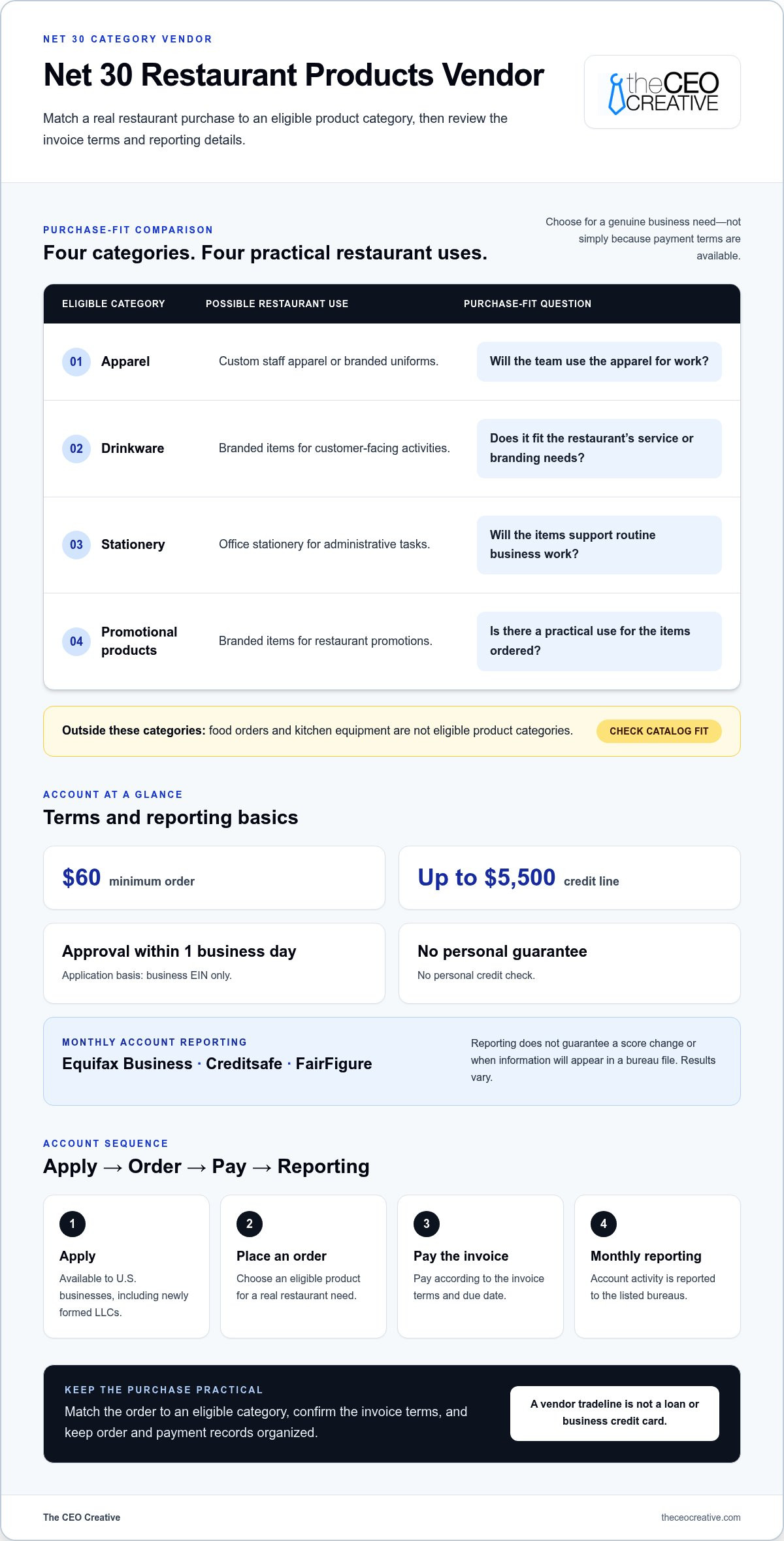
| Category | Possible restaurant use | Purchase-fit question |
|---|---|---|
| Apparel | Custom staff apparel or branded uniforms | Will the team use the apparel for work? |
| Drinkware | Branded items for customer-facing activities | Does this fit the restaurant’s actual service or branding needs? |
| Stationery | Office stationery for administrative tasks | Does the item support routine business work? |
| Promotional products | Branded items for restaurant promotions | Is there a practical use for the items ordered? |
Branded products for restaurant teams and customers
Custom apparel can give a restaurant team a consistent look. Think about the roles that will use the apparel and what is practical for the work, rather than assuming one option suits everyone. Explore the Net 30 apparel vendor category for branded team apparel.
Branded drinkware or promotional products can support customer-facing activities. Before ordering, decide how the items will be used, who they are for, and whether the quantity fits the planned activity. A product is a stronger purchase fit when it supports an existing business need, not just because it carries the restaurant’s branding.
Administrative purchases that support restaurant operations
Stationery and office items can support administrative tasks and help keep business work organized. Match the order to items the restaurant actually needs and to the vendor’s eligible catalog. These categories do not include food, kitchen machinery, industrial equipment, or packaging supplies.
Apply the same practical test to net 30 accounts for restaurants: does the purchase fit an eligible category, serve a real business purpose, and fit the cash available to pay the invoice by its due date? Net terms may help a business conserve business cash flow, but they do not remove the obligation to pay. Plan the invoice payment alongside the restaurant’s other routine expenses.
How the Restaurant Net 30 Account Works, Including Reporting
The account follows a straightforward sequence: apply, place an eligible order, pay the invoice according to its terms, and allow the vendor to report account activity monthly. If another eligible purchase makes sense, the business can repeat the process. Knowing what happens at each step helps restaurant owners manage orders and payment records without treating a tradeline as a guaranteed credit result.
Application, eligible orders, and invoice payment
The account is available to U.S. businesses, including newly formed LLCs. Applications are based on the business EIN, with no personal guarantee or personal credit check. Approval is within 1 business day. This is the stated approval timing, not a promise that every application will be approved.
After approval, select products from the eligible categories and place an order of at least $60. The credit line is up to $5,500. Review the invoice terms, record the due date, and plan payment through the restaurant’s usual bookkeeping or payment process. Net 30 describes payment terms. It is not a reason to order more than the business can repay.
What monthly reporting can and cannot tell you
The CEO Creative reports account activity monthly to Equifax Business, Creditsafe, and FairFigure. Monthly reporting describes when the vendor submits information, not when a bureau will display a tradeline in a business credit file. Bureau processing and display timing vary. Reporting does not guarantee that an account will appear in a particular file or produce a specific score outcome.
For details about the account’s EIN-based application, see EIN-only Net 30 vendors. Provide accurate business information, order only within eligible categories, and make payments according to the invoice terms.
For restaurants using net 30 accounts for restaurants as part of a business credit routine, consistency and recordkeeping matter. Keep order confirmations, invoices, and payment records together. Monitor due dates and review business credit files over time. Monthly reporting is the vendor’s reporting schedule, not a guarantee about when or how a bureau will update a file. This account is a vendor tradeline, not a loan or business credit card. For a related guide to Net 30 accounts for dental practices, see how eligible purchases and invoice management can apply to another type of business.
Restaurant Owner Checklist: Use a Net 30 Account Responsibly
A repeatable process can make a vendor account easier to manage alongside restaurant operations. Before ordering, check the business details, purchase, invoice schedule, and recordkeeping plan. These steps support clear administration, but they cannot guarantee a credit score change or a particular bureau outcome.
A practical checklist before the first order
- Check business details. Enter the restaurant’s correct legal business name and EIN. Keep the account information consistent with the business’s own records.
- Match the order to a real need. Choose an eligible product for a genuine business or branding purpose. Do not order solely to create account activity.
- Review the invoice terms. Read the invoice and note the due date. Add it to the bookkeeping workflow or payment calendar the restaurant already uses.
- Plan for payment. Track the invoice alongside routine restaurant expenses. Consider whether the business can pay on time without assuming that cash flow will be the same every month.
- Keep account records. Save order details, invoices, payment confirmations, and relevant account correspondence together. This makes it easier to manage the account and review activity.
- Review business credit files. Check bureau files periodically for reported information. Monthly reporting does not mean an account will appear immediately, and bureau display timing varies.
Common Net 30 account mistakes to avoid
- Ordering unsuitable products. Choose items from eligible categories that meet a real restaurant need. The account is not for food, kitchen equipment, or shipping supplies.
- Missing invoice due dates. Do not rely on memory. Put each due date in the system the business uses to manage payments.
- Buying only to chase a score increase. Account activity does not guarantee a credit score change. Choose purchases for their business use first.
- Expecting immediate bureau display. Reporting is monthly, but each bureau controls its processing and file display. Do not treat monthly reporting as a display deadline.
- Confusing a tradeline with funding. A vendor account records eligible purchasing and payment activity. It is not a loan, credit card, or guaranteed funding.
Use this checklist to make net 30 accounts for restaurants part of a disciplined purchasing routine. Results vary. This information is not financial or legal advice.
Review the account’s terms and eligible categories on the business Net 30 account page.
Is The CEO Creative a Fit for Restaurant Net 30 Purchases?
The CEO Creative’s account can fit a restaurant with a real need for eligible custom apparel, drinkware, stationery, or promotional products and a plan to pay each invoice according to its terms. It is a reporting vendor account for product purchases, not a way to finance food orders, kitchen equipment, or packaging. Reporting does not guarantee a particular credit result.
When this vendor account may fit a restaurant
One account gives businesses access to multiple product categories, which can suit an operator with more than one eligible purchasing need. That does not mean every item is right for every restaurant. Choose products for their practical use, check that they are in the eligible catalog, and consider whether the business can manage payment under the invoice terms.
The account has a $60 minimum order and a credit line of up to $5,500. The CEO Creative reports monthly to Equifax Business, Creditsafe, and FairFigure. The company is BBB Accredited with an A+ rating, has been in business for 6+ years, and has 50,000+ reported tradelines. These details describe the company and account, not a promise of approval, bureau display, or credit score change.
When comparing Net 30 accounts for food trucks and other Net 30 vendors, focus on the eligible categories, application basis, payment terms, and bureaus reported to. Consider whether the account fits the restaurant’s actual purchasing plans, rather than choosing based on a category name alone.
Next steps for restaurant owners
Before applying, identify an eligible purchase and decide how its invoice due date will fit into the restaurant’s bookkeeping routine. The account is based on the business EIN, with no personal guarantee or personal credit check. Approval is within 1 business day, but this is not a guarantee of approval. If approved, make eligible purchases, pay invoices according to their terms, and keep order and payment records.
For a restaurant considering net 30 accounts for restaurants, the key question is whether the vendor’s product categories meet a real business need and whether the business can pay on time. The CEO Creative reports monthly to Equifax Business, Creditsafe, and FairFigure. Bureau display timing varies. Results vary, and this content is not financial or legal advice.
Review the business Net 30 account and its terms before deciding whether an eligible purchase fits your restaurant.
For restaurants, net 30 accounts for restaurants are most useful when eligible purchases meet a real business need and invoice payments fit the business’s routine. Keep the account distinct from food, equipment, or packaging purchases, and track due dates consistently.
It is BBB Accredited with an A+ rating, has been in business for 6+ years, and has 50,000+ reported tradelines. Reporting does not guarantee a bureau display date or a particular credit outcome. Results vary. This article is not financial or legal advice.
Start with a suitable purchase, a plan for the invoice due date, and accurate account records. Apply through The CEO Creative’s business Net 30 account page when the product categories and terms fit your restaurant.
Frequently Asked Questions
What are Net 30 accounts for restaurants?
Net 30 accounts for restaurants are vendor accounts that let a business order eligible products and pay an invoice according to its stated terms, commonly within 30 days. The vendor may report account activity to business credit bureaus. A vendor tradeline is not a loan or credit card. Choose products that meet real business needs; reporting does not guarantee a score increase or a particular bureau outcome.
Can a new restaurant LLC apply for a Net 30 account?
Yes. The CEO Creative serves U.S. businesses, including newly formed LLCs. The account is based on the business EIN, with no personal guarantee or personal credit check. Approval is within 1 business day, but this does not mean every application will be approved. Provide accurate business details and remember that results vary.
Which bureaus does The CEO Creative report Net 30 accounts to?
The CEO Creative reports account activity monthly to Equifax Business, Creditsafe, and FairFigure. Monthly reporting is the vendor’s reporting schedule, not a date when a bureau will display the account in a business credit file. Each bureau’s processing and display timing can vary. Reporting does not guarantee that a tradeline will appear or lead to a specific credit score change.
What can a restaurant order through a Net 30 vendor account?
The CEO Creative offers custom apparel, drinkware, stationery, and promotional products. A restaurant might order staff apparel for its team or branded customer items for business use. The account is not for food, restaurant equipment, or shipping and packaging supplies. Choose products that fit an eligible category and meet an actual business need, then consider the invoice terms and payment plan before ordering.
What is the minimum order for The CEO Creative’s Net 30 account?
The minimum order is $60, and the credit line is up to $5,500. The credit line is not guaranteed to every applicant. Use the eligible product categories and account terms to guide an order, select items with a real business purpose, and plan to pay the invoice by its due date.
Does paying a Net 30 invoice guarantee a business credit score increase?
No. Paying invoices on time and having account activity reported monthly do not guarantee a score increase or a particular credit outcome. Bureau processing and display timing vary. Keep accurate account records and pay according to the invoice terms. Results vary. This article is for informational purposes and is not financial or legal advice.
How should a restaurant use a Net 30 vendor account responsibly?
Order eligible products the restaurant genuinely needs, record each invoice due date, and pay according to the account terms. Keep order and payment records with the business’s other administrative documents, then review business credit files periodically. Do not order only to chase a score increase or assume monthly reporting means an account will appear immediately. Responsible use supports clear business administration, but it cannot promise a particular credit outcome.