

Net 30 accounts for nonprofits can pair an eligible purchase with invoice terms and monthly business credit reporting. If your organization already needs apparel for staff, volunteers, or an event, a Net 30 apparel vendor can help you make that purchase on terms while building a record of account activity. Reporting and on-time payment do not guarantee a particular credit result.
Before applying, consider whether your organization can manage the invoice and pay it by its due date. This article explains how to apply using an EIN, plan a practical order, keep payment records, and understand monthly bureau reporting. It also covers which bureaus receive reports and why information may not appear in a bureau file immediately. The aim is to help your organization use vendor terms for purchases it already needs, with credit-building as a possible benefit rather than a promise.
Key Takeaways
- Net 30 accounts for nonprofits can pair useful purchases with a chance to establish payment history, but credit outcomes are not guaranteed.
- Plan orders around real needs, such as staff shirts, volunteer apparel, or clothing for community events.
- Follow the account sequence: apply, order, receive an invoice, pay by its due date, then allow for monthly reporting.
- Keep organizational details, invoices, due dates, and payment records consistent.
- Compare product fit, account terms, reporting bureaus, and the payment process before choosing a vendor.
What Net 30 Accounts for Nonprofits Actually Do
A Net 30 vendor account lets an organization purchase eligible goods and pay later according to the invoice terms. Net 30 accounts for nonprofits may help establish business credit history when the vendor reports account activity. Neither reporting nor on-time payment guarantees a specific credit result.
In this section:
How Net 30 differs from paying at checkout
At checkout, the organization pays when it places an order. With invoice-based terms, the vendor bills the organization and provides a due date. “Net 30” generally means payment is due within 30 days under the account terms. The invoice and account agreement set out the specific due date and payment instructions, so review them for each purchase.
This arrangement is a form of trade credit: a supplier provides goods before receiving payment. A vendor account applies to eligible purchases from that supplier. It is not a grant, a loan, or a credit card. For broader context, see this Net 30 vendor comparison guide.
Why a nonprofit might consider vendor terms
Vendor terms can help an organization coordinate a planned purchase with its invoice and payment schedule. For example, a nonprofit that already needs staff or volunteer apparel can order those items, record the invoice, and schedule payment for its due date. This creates a clear purchasing record and supports deliberate cash-flow management. It does not remove the obligation to pay on time.
A reporting Net 30 vendor account lets an organization buy eligible goods on invoice terms while the vendor reports account activity to business credit bureaus. The practical value comes from matching useful purchases with careful account management, not from buying items solely to pursue a credit outcome. Whether a payment appears in a bureau file, and how it affects a credit profile, can vary.
What Nonprofits Can Order Through a Net 30 Apparel Vendor
A Net 30 apparel vendor lets a nonprofit purchase eligible clothing on invoice terms. Choose apparel the organization already plans to use, rather than buying items only in the hope of changing its credit profile.
Match apparel purchases to real organizational needs
Start with a specific purpose. Staff shirts can help identify team members during programs or community activities. Volunteer apparel can make it easier for participants to recognize event coordinators. Branded clothing can support a consistent look for a scheduled gathering or outreach effort.
Before ordering through a Net 30 apparel vendor, note what the clothing is for, who will use it, and how the expense fits the organization’s budget. Then select an order that matches the plan. Documenting the purpose keeps the purchase connected to operations and makes the invoice easier to review and record.
For apparel options on vendor terms, visit the Net 30 apparel vendor page. Choose clothing for an organizational need, review the invoice when it arrives, and pay according to its due date.
Consider an account that supports more than apparel
Some organizations also need products in other categories. The CEO Creative offers one account across categories that include drinkware, stationery, office supplies, and promotional products. These options can support planned restaurant purchases through Net 30 accounts for restaurants, but they are not a reason to expand an order beyond the nonprofit’s needs. Keeping orders tied to an operating purpose makes account activity easier to manage.
For nonprofits considering net 30 accounts for nonprofits, the practical question is whether each order belongs in the organization’s purchasing plan. Apparel and other eligible purchases can be handled through one account, while each invoice still needs to be tracked and paid on time.
Useful purchases support responsible account activity when they are planned, budgeted, and paid by the invoice due date. Review the Net 30 business account details to understand the account terms.
How Nonprofit Net 30 Accounts Apply, Report, and Repeat
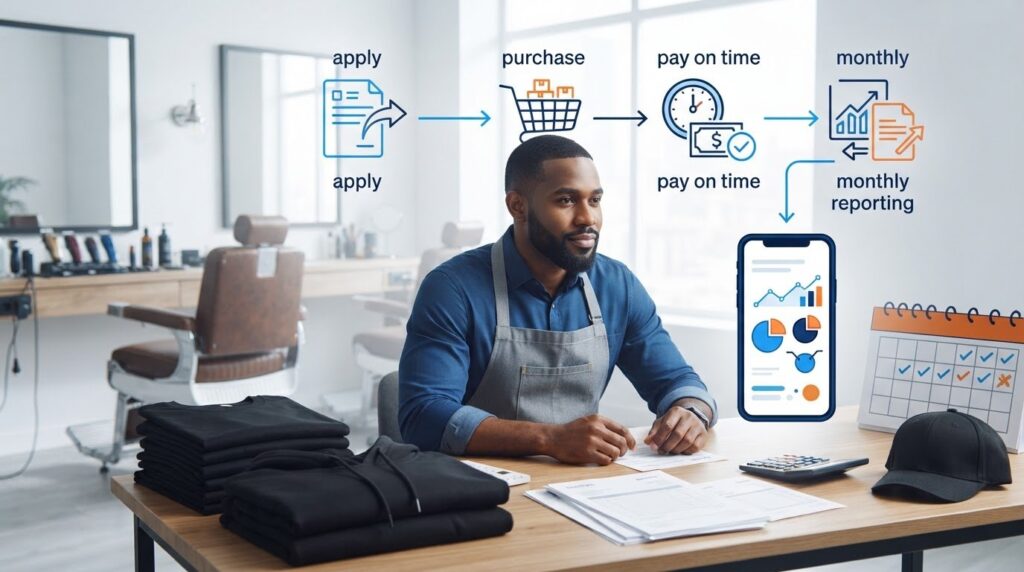
For net 30 accounts for nonprofits, the process is straightforward: apply, place an eligible order, receive an invoice, pay by its due date, allow for monthly reporting, and repeat when another planned purchase makes sense. Consistent records help keep each step clear. Reporting activity does not guarantee a particular credit score or outcome.
Applying with organizational business details
The account is based on the organization’s EIN. It does not require a personal guarantee or personal credit check. Use the same organization name and EIN on the application, order records, and payment records. Consistent details help keep account documentation organized.
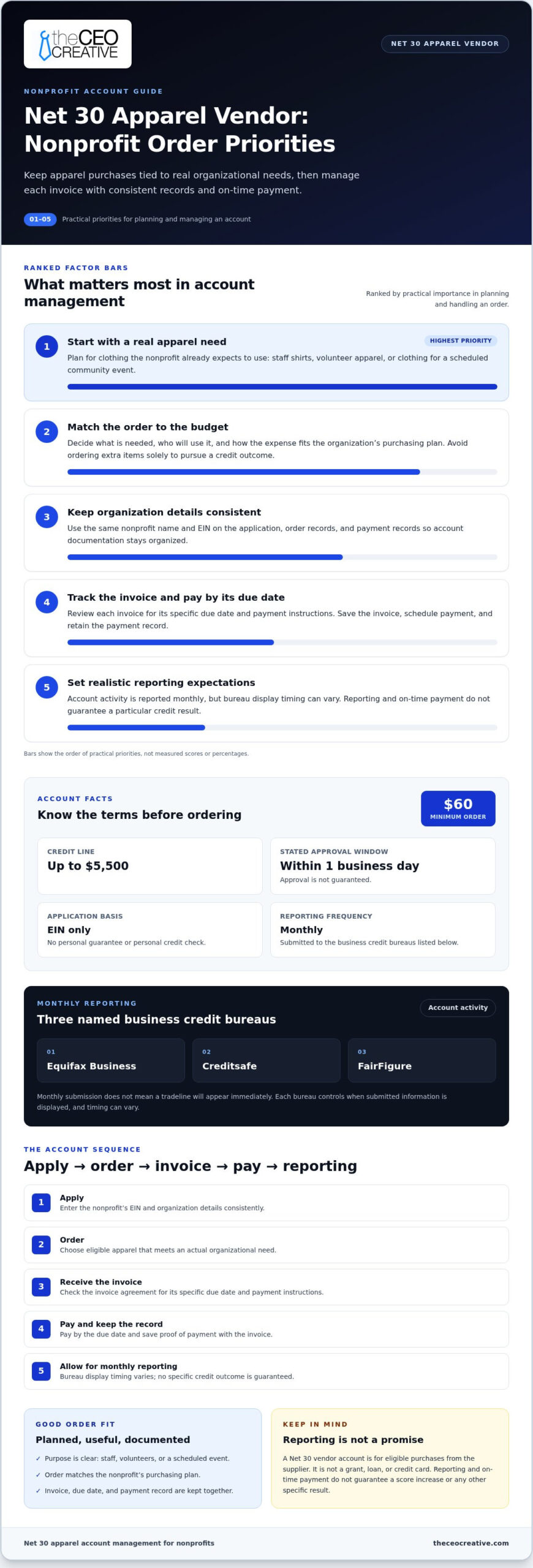
The minimum order is $60, and the credit line is up to $5,500. The stated approval window is within 1 business day, but approval is not guaranteed. For more information on EIN-based applications, read about EIN-only Net 30 vendor accounts.
Understanding monthly tradeline reporting
After an order is placed, the vendor issues an invoice with payment instructions and a due date. Save the invoice, schedule payment by the deadline, and retain the payment record. The account reports monthly to Equifax Business, Creditsafe, and FairFigure.
Monthly reporting describes how often account information is sent. It does not mean a tradeline will appear in a bureau file immediately. Each bureau controls when submitted information is displayed, and display timing can vary. A reported payment is not a promise of a score increase or any other specific credit result.
Use a repeatable routine:
- Apply: Enter the nonprofit’s EIN and organization details consistently.
- Order: Purchase eligible items that meet an actual organizational need.
- Receive and record: Save the invoice and note its due date.
- Pay: Follow the invoice instructions and keep proof of payment.
- Allow reporting, then repeat: Reporting is monthly, while bureau display takes its own time. Place another order only when it fits the organization’s plans.
A Nonprofit Checklist for Managing a Net 30 Account
A simple process helps a nonprofit team keep purchases, invoices, and payment responsibilities organized. Use this checklist to manage net 30 accounts for nonprofits with a clear purpose for each order and consistent records of account activity.
Before placing the first order
- Assign a purchasing lead. Decide who can place orders and who will review invoices. Make responsibilities clear to the staff or volunteers involved in account management.
- Document the purchase purpose. Note what the organization needs, how the items will be used, and which budget will cover the order. Do not buy apparel or other eligible goods solely to create account activity.
- Check the available budget. Confirm that the planned purchase fits the organization’s spending plan before ordering.
- Use consistent organization details. Keep the nonprofit’s name, EIN, and account details consistent across applications, order confirmations, invoices, and payment records.
- Plan for the minimum. The minimum order is $60. Make sure the purchase meets that requirement and reflects a genuine need. An order below the minimum does not qualify.
After the invoice arrives
- Review and assign the invoice. Check that it matches the order, then assign someone to arrange payment by the due date stated on the invoice.
- Keep a complete account file. Store order confirmations, invoices, payment records, and account correspondence together. An organized shared file helps another authorized team member follow the payment history if responsibilities change.
- Record the payment. Save payment confirmation with the invoice. This gives the organization a clear record of when the bill was handled.
- Allow time for bureau display. Reporting is monthly, but each bureau’s display timing can vary. Do not assume an entry must appear immediately or that its absence proves reporting failed.
Common mistakes to avoid
- Buying unnecessarily: Choose purchases that meet a documented organizational need.
- Missing the due date: Assign payment responsibility and record the invoice deadline as soon as it arrives.
- Using inconsistent records: Keep the organization’s identifying details aligned across account documents.
- Expecting instant bureau display: Monthly reporting does not mean information will appear right away.
- Ordering without checking the budget: Confirm the planned expense fits before placing the order.
Results vary, and account activity does not guarantee a specific credit outcome. This information is general education, not financial or legal advice.
Choose a Net 30 Vendor That Fits Your Nonprofit’s Operations
A suitable account should fit both the purchase and the organization’s payment process. When comparing net 30 accounts for nonprofits, consider whether the products meet a real need, what the terms require, which bureaus receive reports, and how your team will track invoices and due dates. Do not choose an account based only on a hoped-for credit result or an assumed approval.
Compare product fit, terms, reporting, and workflow
- Product fit: Consider whether apparel or other eligible products support planned staff, volunteer, event, or operating needs.
- Stated terms: Review the minimum order, credit line, application basis, and invoice payment process before ordering.
- Reporting: Check which bureaus receive account information and how often it is reported. Monthly reporting does not guarantee when a bureau will display a tradeline or what effect it may have.
- Payment workflow: Decide who reviews invoices, records due dates, arranges payment, and saves account documents. Assigning responsibility for each task can help prevent missed steps.
The CEO Creative’s account is EIN-based, with no personal guarantee and no personal credit check. The minimum order is $60, and the credit line is up to $5,500. The stated approval window is within 1 business day, but that does not guarantee approval. Account activity is reported monthly to Equifax Business, Creditsafe, and FairFigure. The CEO Creative is BBB Accredited with an A+ rating.
Plan a useful first purchase
Start with an item the nonprofit already intends to buy. Document its purpose and budget, confirm the order meets the $60 minimum, and identify who will handle the invoice and payment. This keeps the account tied to practical purchasing rather than spending solely to pursue credit-building. Reporting may contribute to a business credit file, but results vary and no specific credit outcome is guaranteed.
Review the account terms and decide whether a planned apparel purchase fits your organization’s needs and payment workflow.
Build a Careful Purchasing Routine
Net 30 accounts for nonprofits work best when purchases serve real organizational needs and the team can track each invoice through payment. Start with a planned apparel order, keep the nonprofit’s account details consistent, and assign responsibility for the due date and records.
The CEO Creative account uses an EIN, with no personal guarantee or personal credit check, and reports monthly to Equifax Business, Creditsafe, and FairFigure. The CEO Creative is BBB Accredited with an A+ rating. Monthly reporting does not guarantee when information will appear in a bureau file or determine a particular credit outcome. Results vary.
Review the account terms and decide whether a useful first purchase fits your nonprofit’s budget and payment process. A steady, well-documented routine gives your organization a clear way to manage vendor terms responsibly.
Take the next step with the purchase purpose and payment plan in place.
Frequently Asked Questions
Can a nonprofit apply for a Net 30 vendor account using its EIN?
Yes. A nonprofit can apply using its EIN for The CEO Creative’s account, which does not require a personal guarantee or personal credit check. The account is available to US businesses, including newly formed LLCs, with no minimum time in business. Approval is not guaranteed. Keep the organization’s name and EIN consistent across application and account records for clear documentation.
Do Net 30 vendor accounts help nonprofits build business credit?
They may help establish business credit history when account activity is reported, but results vary. Net 30 accounts for nonprofits work best as part of a responsible purchasing routine: order goods the organization needs, track invoices, and pay by each due date. Reporting does not guarantee that a tradeline will display by a particular date or produce a specific credit score or outcome.
Which business credit bureaus does The CEO Creative report to?
The CEO Creative reports account activity monthly to Equifax Business, Creditsafe, and FairFigure. Monthly reporting means information is sent on a recurring basis, but it does not determine when a bureau will display a tradeline. Bureau processing and display timing can vary. Reporting a payment also does not guarantee a particular change to a nonprofit’s business credit profile.
Does a nonprofit need a personal guarantee for this Net 30 account?
No. The CEO Creative’s account is based on the organization’s EIN and does not require a personal guarantee or personal credit check. The application uses organizational details rather than requiring a board member or staff member to provide a personal guarantee. Approval is not assured, and the organization remains responsible for managing invoices according to their terms.
What is the minimum order for The CEO Creative’s Net 30 account?
The minimum order is $60. Plan a purchase that meets this amount and serves a genuine organizational need, such as apparel for staff, volunteers, or a planned event. Do not place an unnecessary order only to create account activity. Make sure the expense fits the nonprofit’s budget and someone is assigned to review and pay the invoice by its due date.
How long does it take for a Net 30 tradeline to appear on a bureau report?
There is no guaranteed display timeline. The CEO Creative reports monthly to Equifax Business, Creditsafe, and FairFigure, but each bureau controls when information appears in its files. A tradeline may not show immediately after payment or reporting. Keep the invoice and payment record, allow time for bureau processing, and do not treat a delayed display alone as proof that reporting failed.
What should a nonprofit buy through a Net 30 apparel vendor?
Choose apparel tied to a planned organizational use. Staff shirts can help identify team members, volunteer apparel can support event coordination, and branded clothing may suit a scheduled program or gathering. Document the purpose and budget before ordering. Keep the purchase within the organization’s needs and payment capacity, rather than buying clothing solely in hopes of improving business credit.