

What if a bakery could connect a planned branding purchase with a vendor account that reports payment activity? Net 30 accounts for bakeries may fit eligible purchases such as team apparel, drinkware, stationery, or promotional products, but they aren’t a way to pay for ingredients or bakery equipment.
Choosing an account takes more than finding a payment term. You’ll want to understand what purchases qualify, how the application and payment process works, and what monthly reporting does and doesn’t mean for your business credit file. This article walks through those details and offers a practical checklist for managing an account responsibly. Credit outcomes aren’t guaranteed, and bureau display timing varies.
Key Takeaways
- Net 30 accounts for bakeries may suit eligible branded business purchases, not ingredients, bakery equipment, or packaging supplies.
- Compare account terms by eligible purchase categories, minimum order, payment schedule, and clear reporting details.
- Understand the steps from application to ordering, payment, monthly reporting, and repeat use before opening an account.
- Use a simple checklist to plan purchases, track due dates, and avoid orders that don’t fit your bakery’s needs.
- Reporting can create a business tradeline, but credit outcomes aren’t guaranteed and bureau display timing varies.
What Net 30 Accounts for Bakeries Can, and Cannot, Cover
Bakery owners can consider Net 30 vendor accounts for eligible business purchases. A reporting vendor account lets a business buy qualifying products on stated payment terms. When the vendor reports account activity, payments may establish a business credit tradeline. Reporting does not guarantee that a bureau will display a tradeline or that a particular credit result will follow.
Net 30 is a form of trade credit: a supplier allows a business to receive eligible goods and pay the invoice later under agreed terms. For a basic overview, see What is trade credit? A vendor account is not a loan, business credit card, or financing for bakery equipment. The purchase must fit the vendor’s eligible categories.
Bakery purchases that fit branding and business identity
Think about items that help present or promote the bakery, rather than goods used to make its products. Branded team apparel can give staff a consistent look at the counter or at community events. Drinkware and promotional products can help customers recognize the bakery’s name, while stationery can support everyday business communication.
Why a vendor account is different from bakery financing
A vendor account applies to eligible purchases from that vendor. It doesn’t provide general-purpose funds for an oven, mixer, renovation, or other equipment. It also shouldn’t be treated as a way to cover ingredients or daily food inventory. Those are separate operating needs, not branding purchases.
This distinction matters when comparing Net 30 vendor accounts. Focus on what the account actually lets your bakery purchase, how payment is handled, and whether the vendor reports account activity. Don’t assume that every supplier reports tradelines or that using any Net 30 terms automatically builds a credit file.
For this account, the eligible purchase focus is branding-related, including apparel, drinkware, stationery, and promotional products. Ingredients, bakery equipment, shipping, and packaging supplies are outside the described offerings. Keeping that boundary clear helps you avoid applying the account to costs it isn’t designed to cover. Use it only for purchases that support your bakery and that you can manage responsibly under the stated payment terms. This information is educational, not financial or legal advice.
How a Bakery Net 30 Account Works from Application to Reporting
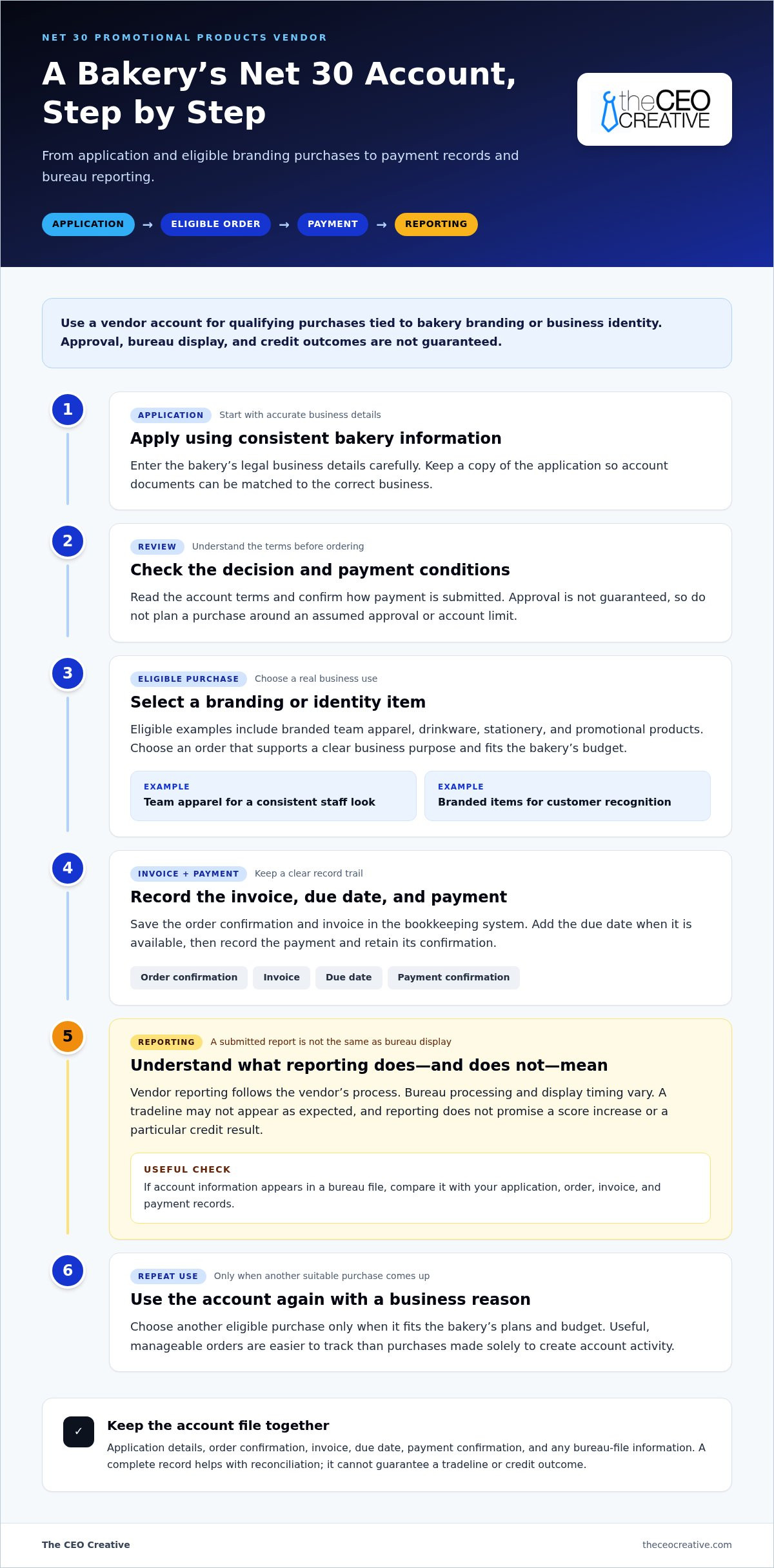
The account process follows a practical sequence: submit an application, review the decision and terms, place an eligible order, pay the invoice, then use the account again only when another suitable purchase comes up. Treat each stage as a business recordkeeping task. That makes it easier to connect an order to its invoice and payment, especially when bakery operations are busy.
- Apply with accurate business information. Enter the bakery’s legal business details carefully and keep a copy of the application. Consistent records make it easier to match account documents to the right business later.
- Review the account decision and terms. Before ordering, read the payment conditions and make sure you understand how to submit payment. Approval isn’t guaranteed. Don’t plan a purchase around an assumed approval or account limit.
- Choose a suitable order. Select an item from the account’s eligible categories that meets a real branding or business-identity need. The account is for qualifying vendor purchases, not general-purpose funding. The Small Business Administration discusses the general cash-flow considerations of Net 30 terms in its overview of Benefits of Net 30 for cash flow.
- Record and pay the invoice. Save the order confirmation and invoice in your bookkeeping system. Enter the due date as soon as it’s available, then record the payment and retain its confirmation. This creates a clear trail if you later need to reconcile your account records.
- Repeat when there’s a business reason. Use the account again only for another eligible purchase that fits your plans and budget. Regular, useful purchases are easier to manage than orders made solely to create account activity.
Payment and business credit reporting
Account information is submitted to business credit bureaus according to the vendor’s reporting process. A submitted report and a tradeline visible in a bureau file aren’t the same event. Bureau processing and display timing vary, so don’t base your bookkeeping or future spending decisions on an assumed display date.
Reporting does not promise a score increase.
Keep the application, order records, invoices, and payment confirmations together. If a bureau file later shows account information, compare it with your records rather than relying on memory. If information doesn’t appear as expected, first check that your own documents show the correct business details and completed payment. Reporting and credit outcomes vary; maintaining records is useful, but it can’t guarantee a tradeline or a particular result.
Review the account conditions and application details on the EIN-based Net 30 account page before deciding whether to apply. Choose an order you can manage under the stated terms, and keep its due date in your regular accounts-payable workflow.
How to Assess Bakery Net 30 Vendor Accounts Before Applying
Compare accounts by what you can buy, when payment is due, the minimum order, and whether the vendor clearly explains its reporting process. For bakeries, the key distinction is between operational essentials and eligible purchases tied to branding or business identity. Don’t assume every supplier reports payment activity to business credit bureaus. Confirm the reporting details as part of your account assessment.
| What to compare | What to check |
|---|---|
| Eligible category | Does the account cover purchases that fit your business and the vendor’s stated product categories? |
| Payment terms | Can you identify the due date and payment process before placing an order? |
| Minimum order | Does the required order amount fit a purchase you already plan to make? |
| Reporting clarity | Does the vendor state whether it reports, which bureaus receive reports, and how often? |
Match eligible purchases to bakery operations
Start with an existing need. Branded apparel may support a consistent staff presentation, while promotional products can help put the bakery’s name in front of customers. Drinkware and stationery are also branding-related categories, not ingredients or bakery supplies. Explore the Net 30 promotional products vendor category when a planned promotion or customer-recognition effort makes those items useful.
Check the terms that affect responsible use
Compare the $60 minimum order with a planned eligible purchase rather than adding items just to reach the threshold. The credit line is up to $5,500, not an assured limit for every applicant. Review the payment terms and reporting explanation together, and choose an order you can manage within your budget. No vendor account can promise a specific credit outcome.
Be direct about the account’s limits. It isn’t a source of funds for ingredients, daily food inventory, ovens, mixers, or other bakery equipment. Those needs don’t become eligible simply because a business is offered Net 30 terms. Assess this type of account for the products it covers, such as branded apparel or promotional items, and consider other operating needs separately.
For net 30 accounts for bakeries, the useful comparison isn’t just whether an account offers delayed payment. It’s whether the eligible category suits a real purchase, the terms are clear enough to plan around, and reporting is explicitly described. A stated reporting policy still doesn’t guarantee that a tradeline will appear or change a business credit profile. Results vary, and bureau display timing is controlled by each bureau.
Before applying, write down the specific purchase you have in mind, its business purpose, and how you’ll track the invoice and payment. If those details are clear and the purchase fits the account’s stated categories, you can make a more informed decision. This content is not financial or legal advice.
A Bakery Owner’s Checklist for Using Net 30 Responsibly
A simple routine can help keep a vendor account connected to real bakery needs and make payment records easier to manage. Use this checklist before applying and after each order. The goal is organized account use, not spending for the sake of a credit file.
Before applying: confirm fit and prepare
Start with a planned purchase, then make sure the account terms and your business records are ready. Net 30 accounts for bakeries are most useful when eligible branded items serve a clear purpose and fit your budget.
- Name the purchase. Write down the specific branded apparel, drinkware, stationery, or promotional products your bakery needs. Note how the items will support staff presentation, customer recognition, or promotion.
- Check category fit. Keep the planned order within the vendor’s eligible categories. Don’t include ingredients, equipment, shipping, or packaging supplies in an order meant for branding purchases.
- Compare the order with the minimum. The minimum order is $60. Check whether a purchase you already plan to make meets it; don’t add items without a business reason.
- Review the account terms. Read the payment schedule and account conditions before placing an order. Treat any stated credit line as a limit, not a spending target.
- Prepare accurate business details. Use the bakery’s correct legal business name and EIN. Keep the information consistent with the records you use for the business.
After ordering: track payment and reporting
Put account activity into the same bookkeeping routine you use for other business invoices. A calendar reminder or accounts-payable task can help keep the due date visible during busy production weeks.
- Save the order record. Record the order date, invoice number, amount, and the business purpose of the purchase.
- Enter the due date. Add the payment deadline to your bookkeeping workflow as soon as the invoice arrives. Assign responsibility for reviewing and paying it if more than one person handles business finances.
- Pay according to the account terms. Save the payment confirmation with the invoice. Don’t rely on a bureau showing the payment by a particular date; bureau display timing varies.
- Review records periodically. Keep invoices and confirmations together so you can compare your account records with business credit file information when available.
Common mistakes to avoid
- Ordering items without a planned business use.
- Adding products just to reach the minimum order.
- Assuming the account covers bakery ingredients or equipment.
- Leaving invoice due dates out of the bookkeeping system.
- Expecting a particular score change or bureau display date.
Responsible use can support a clear payment history, but it can’t guarantee a specific score, tradeline display, or financing outcome. Results vary. This information is not financial or legal advice.
Using The CEO Creative as a Net 30 Vendor for Bakery Branding
The CEO Creative’s Net 30 account may fit a bakery with planned branding purchases, such as team apparel, drinkware, stationery, or promotional products. The account is based on the business EIN, with no personal guarantee or personal credit check. It’s designed for eligible purchases, not ingredients, bakery equipment, shipping, or packaging supplies.
What bakery owners can expect from the account
Choose items that serve a specific purpose for your bakery. Apparel can support a consistent team appearance. Promotional products may help bring your business name to customers’ attention. Drinkware and stationery are additional branding-related categories. The account includes a $60 minimum order and a credit line of up to $5,500. The available credit line is not guaranteed to be the same for every approved account.
Payments are reported monthly to Equifax Business, Creditsafe, and FairFigure. Monthly reporting means account information is submitted on a recurring basis. It doesn’t promise when a bureau will display a tradeline or guarantee a particular credit score or outcome. Results vary, so keep your invoices and payment records and review your business credit files over time.
The CEO Creative states that it has 5,000+ products in stock. This is a client-provided figure. The company is BBB Accredited with an A+ rating and has been in business for 6+ years. These details provide context about the vendor, while the account’s practical fit still depends on whether the eligible purchase meets a real bakery need and works with your payment plan.
Before placing an order, identify the items you plan to buy, confirm they fit the account’s eligible categories, and review the payment terms. Keep the invoice due date in your bookkeeping workflow. Use the account consistently only when a suitable purchase arises, rather than ordering solely in pursuit of a credit score change. Net 30 accounts for bakeries can be one part of a business credit-building approach, but they don’t guarantee a tradeline will appear or lead to a particular financing result.
Next step: review the account terms
Review the application and account terms before deciding whether this vendor account fits your bakery’s planned branding purchases. Check the order minimum, payment obligations, and reporting details so you can make an informed choice.
This content is not financial or legal advice.
Make Your Next Step Part of a Clear Business Plan
For net 30 accounts for bakeries, a useful next step is to decide what a successful purchase should accomplish beyond credit building. A bakery might want a consistent team appearance, clearer brand recognition, or a practical way to support an upcoming promotion. Identify that purpose first, then decide how you’ll judge whether the purchase served it. This keeps account activity connected to your business priorities.
Build the decision into your regular planning. Set aside time to review upcoming brand needs alongside your business budget and payment responsibilities. If a purchase fits, keep its purpose and records easy to find. If there isn’t a genuine need, waiting is a responsible choice. Reporting activity doesn’t guarantee a score change or a particular bureau display, and results vary. This article is for general information, not financial or legal advice.
Thoughtful decisions can help you build stronger business systems one step at a time.
Frequently Asked Questions
Can a bakery use a Net 30 account to build business credit?
Yes. A bakery can use a reporting vendor account as one part of its business credit activity, though a specific outcome isn’t guaranteed. Choose an eligible purchase that already serves a business purpose, then keep the invoice and payment confirmation with your records. For example, you could file those documents alongside other vendor invoices to make account activity easier to track.
What can bakeries purchase with a Net 30 vendor account?
Eligible purchases depend on the vendor’s categories. For this account, bakery owners can consider branding-related items, such as apparel or promotional products. Before ordering, connect the item to a clear use, like presenting a consistent team image or supporting a promotion. The account isn’t intended for ingredients, baking equipment, or other production needs.
Does The CEO Creative report bakery accounts to business credit bureaus?
Yes. The CEO Creative reports account activity to business credit bureaus. Keep your account records organized so you can compare them with information that may later appear in your business credit files. Reporting doesn’t guarantee that a tradeline will display or change a credit profile. Each bureau controls its own processing and display timing.
Can a newly formed bakery LLC apply using only an EIN?
Yes. Newly formed U.S. bakery LLCs can apply using an EIN, and there’s no minimum time in business. Prepare accurate business details before applying, including the LLC’s legal name, and use consistent information in your account records. Approval isn’t guaranteed, so consider whether you have a suitable eligible purchase before submitting an application.
Does a bakery Net 30 account cover ingredients or baking equipment?
No. The account described here covers eligible branding purchases, not ingredients, food inventory, ovens, mixers, or other bakery equipment. Keep those costs separate when planning business purchases. A branded item may fit the account’s categories, while an item used to produce baked goods doesn’t. Review the eligible categories before placing an order.
How much is the minimum order for The CEO Creative’s Net 30 account?
The account has a set minimum order. Check the current account terms and compare that threshold with a planned eligible purchase before ordering. Avoid adding products you don’t need just to meet the minimum. A purchase should have a clear business purpose and fit your budget, whether or not you’re using a vendor account.
How long does it take for a Net 30 tradeline to appear on a business credit report?
There’s no guaranteed display date. A vendor’s reporting schedule doesn’t determine exactly when a bureau will show account information in a business credit file. Check your files periodically rather than expecting an update by a specific deadline. Keep invoices and payment records available in case you need to review account details against the information displayed.